Preview image. Unlock full-res
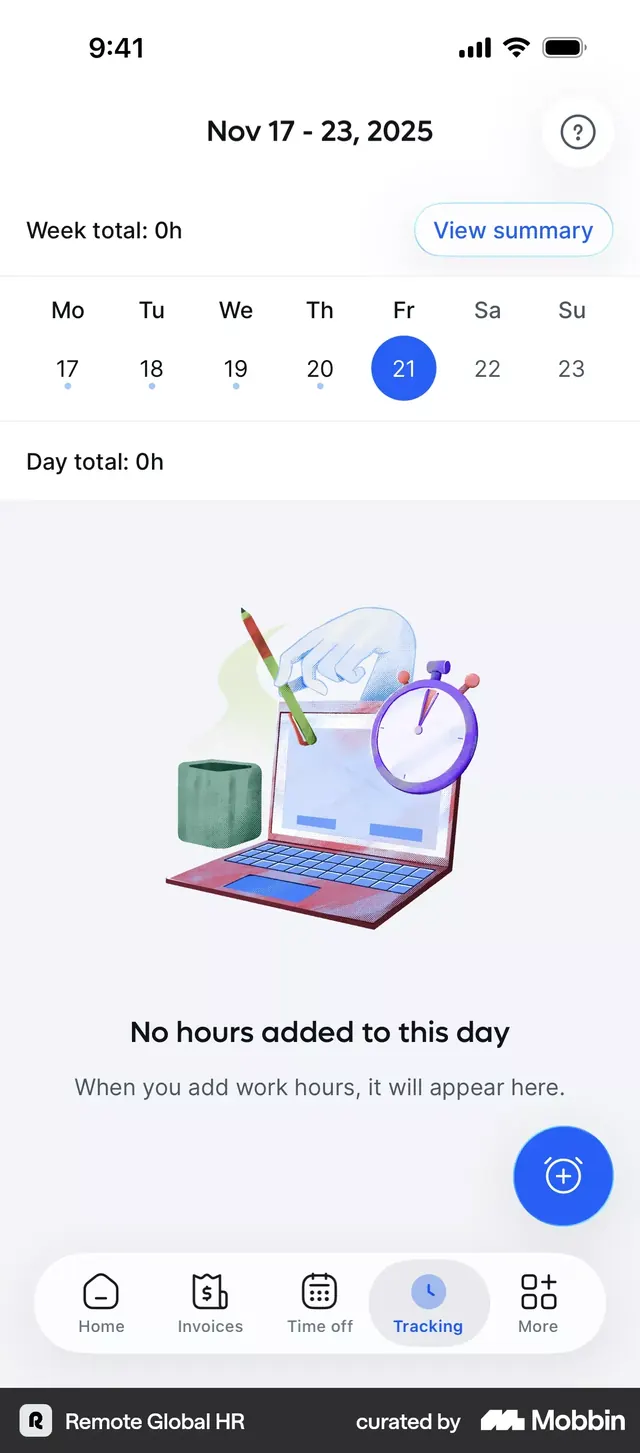
HR time-tracking mobile app showing week-view calendar with passive empty-state illustration and contextual CTA.
Summary
HR time-tracking mobile app using a week-view calendar grid with a passive empty-state illustration, designed to guide first-time users toward adding work hours.
Visual description
A clean, minimal time-tracking screen with status bar and date header (Nov 17-23, 2025). Below is a week grid showing Mo-Su with the 21st (Friday) highlighted in a solid bright blue circle. Section headers ("Week total: 0h" and "Day total: 0h") use a plain sans-serif. The center hosts a muted pastel illustration: a pencil, clock, laptop, and hand rendered in soft blues, greens, and warm accents, floating over a pale lavender background. Below, the text "No hours added to this day" with supporting copy "When you add work hours, it will appear here." A large blue floating action button (+) sits bottom-right. The footer navigation bar includes Home, Invoices, Time off, Tracking (active, highlighted), and More icons in a light gray container.
Key takeaway
The empty-state illustration paired with a single, conversational copy line removes friction for new users. The bright blue selection ring on the calendar date creates clear focus without heavy borders. A floating action button positioned near related content (below the empty message) makes the next action intuitive.
Reuse notes
Strong for task/time-entry apps targeting corporate users. The muted pastel palette and friendly illustration soften a functional interface. Works well when first-time users land on empty screens; pair it with the matching filled states for daily entries.