Preview image. Unlock full-res
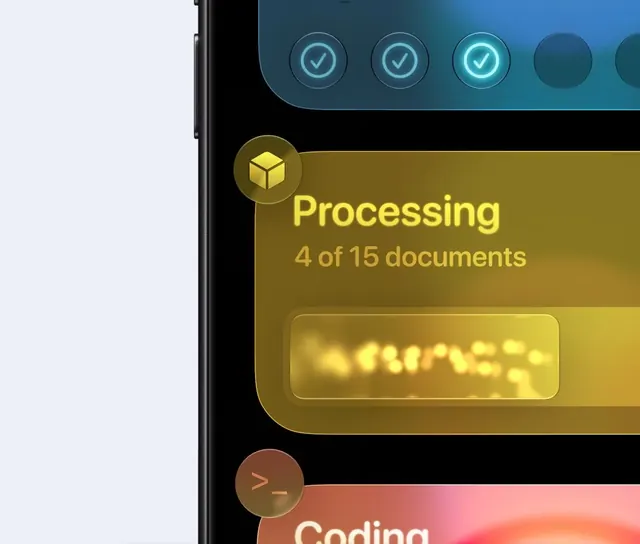
Stacked mobile UI cards showing agent task states including a translucent amber processing panel with a cube icon and a teal step-progress indicator.
More like this
See all

Summary
Stacked mobile UI cards showing agent task states including a translucent amber processing panel with a cube icon and a teal step-progress indicator.
Visual description
A black phone edge occupies the left side of the frame and shows a stack of rounded glassy cards. At the top a blue card holds a row of glowing circular check marks, three filled and two empty. The middle card is a translucent amber panel with the heading Processing in bold yellow, a smaller line reading 4 of 15 documents, and a blurred glowing progress bar of yellow dots inside a recessed pill. A circular cube icon badge overlaps the top-left corner of that card, and a warm orange card with a terminal prompt badge begins at the bottom.
Key takeaway
Overlap a small circular icon badge across the top-left corner of each state card and tint the whole card to its status color. The badge then does the labeling work so the card body can stay sparse, with a single line of count text and one progress element.
Reuse notes
Reach for this as a ui screen reference. Pairs with glassmorphism directions. Original by dynamics.