Preview image. Unlock full-res
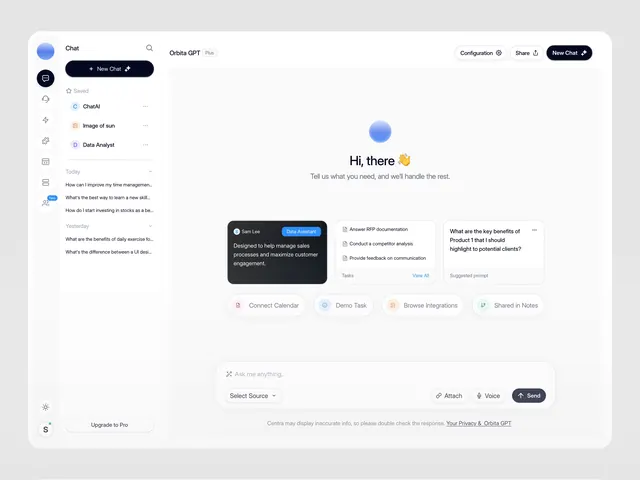
Light, minimalist chat application UI with a narrow left sidebar for conversation history and a spacious main area for chat display, punctuated by a bright blue accent.
Summary
Light, minimalist chat application UI with a narrow left sidebar for conversation history and a spacious main area for chat display, punctuated by a bright blue accent.
Visual description
A chat interface with light gray background (near-white). Left sidebar contains a compact vertical navigation: circular blue icon, "Chat" label, collapsible "New Chat" button with pencil icon, and a list of prior conversations (ChatGPT, Image of ours, Data Analyst). The main area shows a greeting "Hi, there" with centered, friendly copy, followed by a dark charcoal card highlighting key benefits with checkmarks (sales processes, customer engagement), and action cards below (Convert Calendar, Demo Talk, Browse Integrations, Shared in Notes). Bottom bar has a text input ("Ask me anything"), attachment and voice buttons, and a dark "Send" button. Narrow right sidebar surfaces a brief suggestion prompt.
Key takeaway
The clean separation of input/history (sidebar) from content (main), the friendly centering of the opening greeting, and the dark card approach to highlighting key features against a light background without being visually heavy.
Reuse notes
Strong default for SaaS or AI-assistant products. The layout scales well from desktop to tablet widths. The narrow sidebar preserves real estate for the chat itself while keeping conversation history accessible. Works best with conversational copy (like the "Hi, there") rather than product description.