Preview image. Unlock full-res
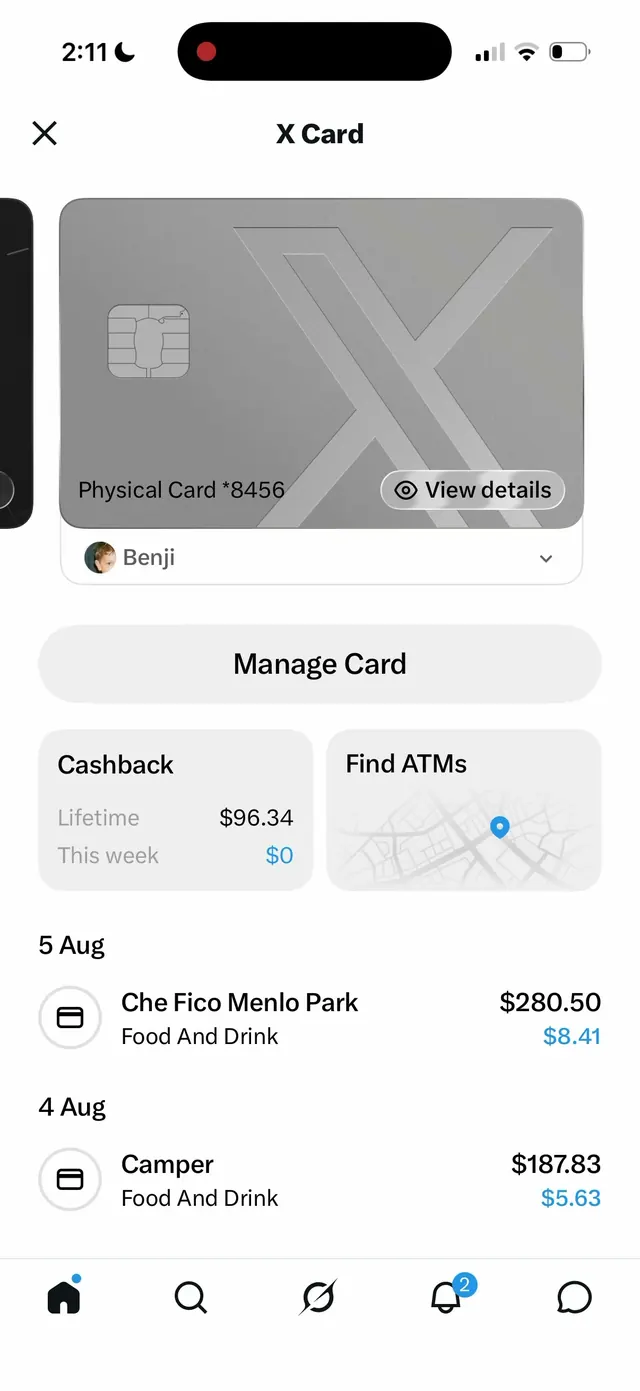
A walkthrough of the updated X Money app interface showing the wallet dashboard, virtual and physical X Card views, cashback tracking, and transaction history in a clean light mobile UI.
More like this
See all
Summary
A walkthrough of the updated X Money app interface showing the wallet dashboard, virtual and physical X Card views, cashback tracking, and transaction history in a clean light mobile UI.
Visual description
A mobile wallet interface with a dark status bar at top and a large card display at center showing a physical X Card in gray with embossed logo and chip. Below the card is a dropdown showing the account holder (Benji), followed by action buttons for managing the card. Two half-width cards display cashback stats and ATM locator with a small map. Transaction history fills the lower half with merchants, amounts, and cashback earnings in blue. A bottom navigation bar provides access to main app sections.
Key takeaway
Present the primary asset (physical card) at top with reduced size and progressive disclosure, then layer secondary actions and transaction history below, letting users scan from what they own to what they've done.
Reuse notes
Reach for this as a ui screen reference. Pairs with minimal, clean directions. Original by Benji Taylor.