Preview image. Unlock full-res
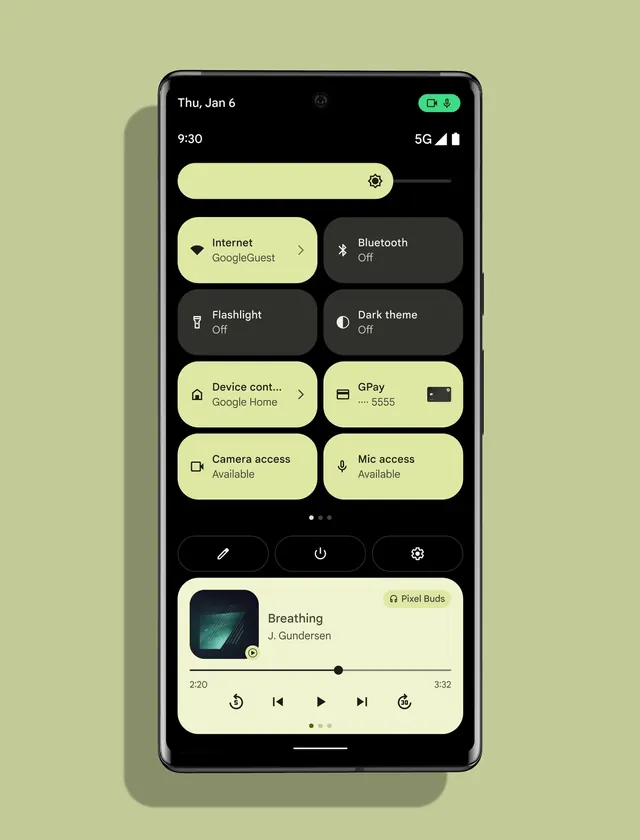
Android Material You system UI showing quick settings panel with soft yellow accent buttons on a dark background.
Summary
Android quick settings panel implementing Google's Material You design language, featuring a soft yellow color accent across interactive buttons and a refined dark UI.
Visual description
A smartphone displays the quick settings control panel with a predominantly black background. At the top is a brightness slider in soft yellow. Below are six toggle buttons arranged in a 2x3 grid: Internet (yellow, active), Bluetooth (dark, off), Flashlight (dark, off), Dark theme (dark, off), Device control (yellow), and GPay (yellow). A music player widget at the bottom shows "Breathing" by J. Gundersen in soft yellow. Status bar at the very top shows date, time, and 5G connectivity.
Key takeaway
The restrained use of a single warm accent color (soft yellow/cream) against a dark interface creates visual hierarchy without overwhelming the UI. Material Design's rounded pill buttons and clear iconography make dense controls feel intuitive.
Reuse notes
Strong reference for system UI, mobile control panels, or dark-mode product interfaces. The color discipline (one accent) across many states demonstrates effective constraint. Translates well to other platforms' settings UIs.