Preview image. Unlock full-res
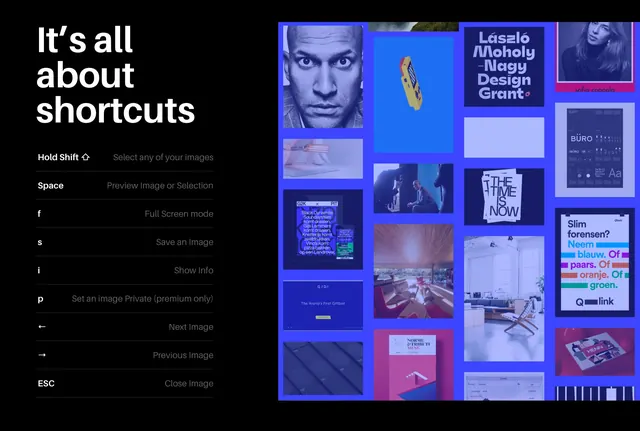
A dark-mode user interface displaying a list of keyboard shortcuts alongside a grid of various visual assets.
Summary
A dark-mode user interface displaying a list of keyboard shortcuts alongside a grid of various visual assets.
Visual description
The layout features a large, bold sans-serif heading on the left with a list of keyboard shortcuts. To the right, a dense grid of colorful rectangular tiles displays diverse imagery including portraits, typography, and abstract graphics.
Key takeaway
Use a high-contrast dark background with oversized typography to make instructional text highly legible and impactful.
Reuse notes
Use this layout for feature tutorials or onboarding screens in software applications.
More like this




Keep what you find
A free account saves references to boards and can send you a weekly email of picks based on what you save.
To see every result, go Pro.