Preview image. Unlock full-res
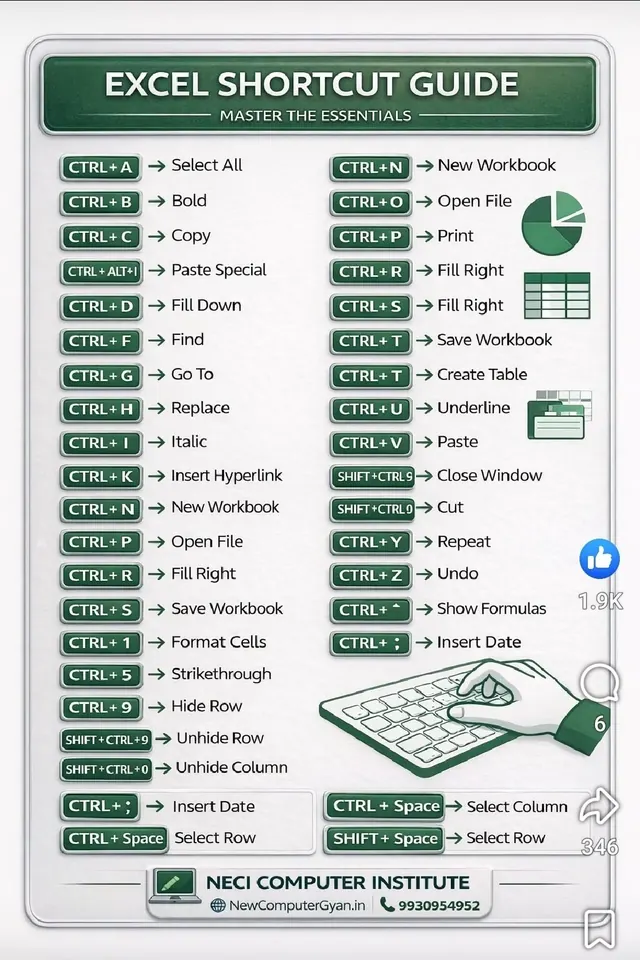
A reference card listing 30+ Excel keyboard shortcuts in a two-column dark-green and white layout, centered under a title banner with keyboard and spreadsheet iconography.
Summary
A functional reference card presenting 30+ Excel shortcuts as left-aligned dark-green badges paired with right-aligned action labels, arranged in two columns below a centered title banner with a keyboard and spreadsheet icon.
Visual description
At the top, a dark-green rounded banner displays "EXCEL SHORTCUT GUIDE" in white sans-serif capitals, with a subtitle "MASTER THE ESSENTIALS" underneath. The banner includes a small green pie chart and spreadsheet grid icon on the right edge. Below, the main content is organized into two columns of shortcut pairs: each row shows a dark-green badge with keyboard notation (e.g., "CTRL+A") followed by an arrow and the action name (e.g., "Select All") in black text. Icons for copy, paste, save, and other actions appear periodically between rows to break up the density. At the bottom right, a hand-drawn illustration of a hand hovering over a green keyboard sits beside a thumbs-up emoji with engagement count and the NECI Computer Institute logo with contact info.
Key takeaway
The dark-green badge + arrow + label pattern is a strong way to present key-value pairs (shortcut-to-action) that are scanned rather than read in depth. The periodic small icons and the footer illustration humanize what could otherwise feel like a dense table. The two-column layout maximizes density while maintaining readability through consistent spacing and alignment. The rounded banner frame signals that this is a self-contained reference.
Reuse notes
Ideal for productivity guides, software tutorials, and educational materials. Works best when the information is factual, stable shortcuts or commands where users will return repeatedly. The dark-green color feels institutional and trustworthy, appropriate for training materials or official guides. The badge style is reusable for any key-value information (menu items, options, API endpoints).
More like this
Keep what you find
A free account saves references to boards and can send you a weekly email of picks based on what you save.
To see every result, go Pro.