Preview image. Unlock full-res
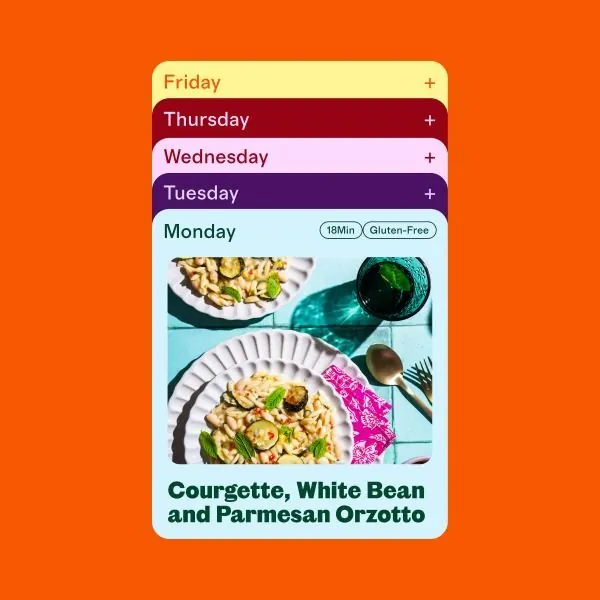
A stacked vertical meal-plan UI with color-coded day buttons and a food photograph anchoring the Monday selection.
Summary
A vertically stacked meal-plan widget using color-blocked button states (one per day) with a large food photograph anchoring the selected day's recipe.
Visual description
Bright orange background with five rounded rectangular buttons stacked vertically, each a different color: pale yellow (Friday), deep maroon (Thursday), light pink (Wednesday), purple (Tuesday), and light cyan (Monday). The Monday button is expanded to show a content card with a photograph of a plated pasta dish (courgette, white bean, and parmesan orzotto), flanked by a fork and glass of water on a light blue surface. Recipe name appears in a dark green sans-serif headline below the photo. Small badge labels ("18Min", "Gluten-Free") sit above the recipe title.
Key takeaway
Color-coded vertical stacks are an efficient way to show state and selection. The photograph preview anchored to the active button immediately communicates the result, reducing cognitive load. The badge labels layer secondary metadata without clutter.
Reuse notes
Strong pattern for meal-planning, recipe apps, or weekly task managers. Works well on mobile and touch interfaces. Ensure the food photography is vibrant and appetizing; pale or poorly lit photos will undermine the design's energy.
More like this
Keep what you find
A free account saves references to boards and can send you a weekly email of picks based on what you save.
To see every result, go Pro.