Preview image. Unlock full-res
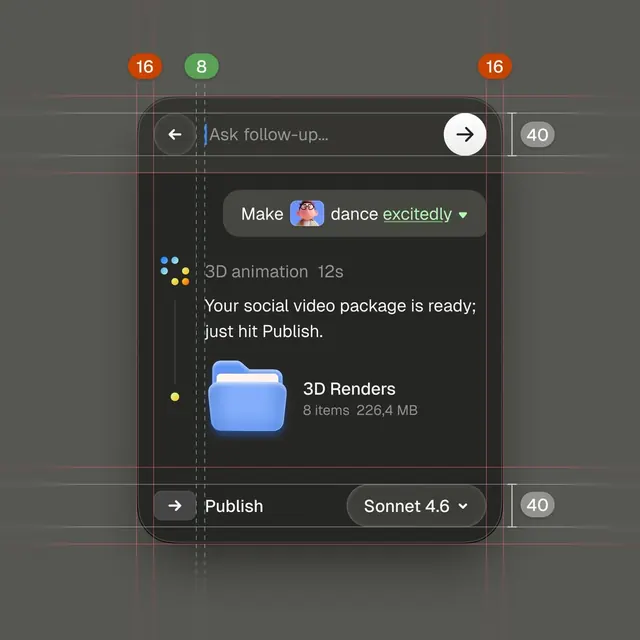
Video animation production interface showing task status, 3D render queue, animation duration, and publish controls with colored indicators and gridded annotation overlays.
Summary
Video animation production interface showing task status, 3D render queue, animation duration, and publish controls with colored indicators and gridded annotation overlays.
Visual description
A dark charcoal UI card with left and right arrow navigation buttons (circles with white arrows), centered text field reading "Make [emoji] dance excitedly" (an animation brief), and below it "3D animation 12s" indicating the render duration. A blue folder icon labeled "3D Renders 8 items 226.4 MB" occupies the lower center. A message states "Your social video package is ready; just hit Publish." Bottom right holds a "Publish" button and a "Sonnet 4.6" selector (likely an AI model choice). The entire UI sits within a grid of thin red/orange measurement lines (design spec overlays) with numbered corner badges (16, 8, 40). Colored dots (red, green, yellow) appear on the left as status indicators. The monochromatic gray background with white text and minimal color accents (teal folder, warm selector) ensures focus on task information.
Key takeaway
The grid overlay and measurement badges are useful design-system documentation techniques. The central card layout with flanking navigation arrows is a proven pattern for sequential tasks. Colored indicator dots pack status info without clutter. Subtle accent colors (teal folder, warm selector) signal interactive elements in a dark interface.
Reuse notes
Strong reference for video-production, animation, or rendering software UI. Dark theme works for extended screen time. The grid and badge system scales for design-tool documentation and spec handoff to developers. Pairs well with status dashboards, render management, and multi-step workflows.
More like this
Keep what you find
A free account saves references to boards and can send you a weekly email of picks based on what you save.
To see every result, go Pro.