Preview image. Unlock full-res
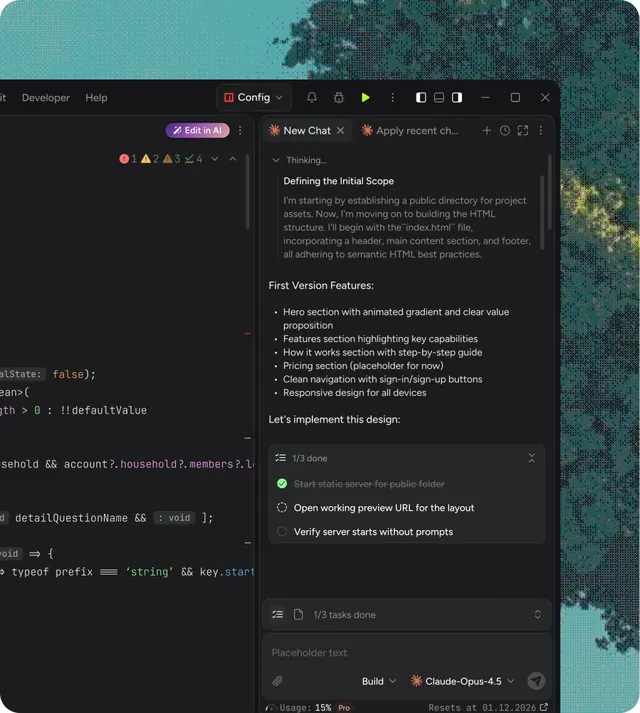
Dark UI showing a code editor with sidebar chat for defining project scope, planning features, and tracking implementation steps.
Summary
A dark-themed IDE with an embedded chat panel on the right, showing AI-assisted project planning, feature scoping, and implementation tracking in a side-by-side layout.
Visual description
Dark charcoal code editor on the left displays actual code snippets (TypeScript/JavaScript). Right panel contains a chat interface with a purple "Edit in AI" button, conversation threads labeled "New Chat" and "Apply recent changes", and a detailed planning section titled "Defining the Initial Scope" with bullet-pointed feature descriptions. Accent colors are teal and light purple; most text is light gray on black. Top toolbar shows Config menu and standard IDE controls. Bottom left displays code snippets; right panel shows scrollable chat content with 1/3 tasks completed indicator and action checkboxes.
Key takeaway
The split-pane design pairing actual code with natural-language planning; the purple accent on the Edit button stands out against the dark palette; the progress indicator (1/3 done) grounds abstract planning in trackable milestones.
Reuse notes
Ideal for developer-tool dashboards, AI-assisted coding environments, or any product pairing code review with conversational planning. The dark theme works well for extended coding sessions. The layout assumes the user knows how to read code; best for technical audiences.
More like this
Keep what you find
A free account saves references to boards and can send you a weekly email of picks based on what you save.
To see every result, go Pro.