Preview image. Unlock full-res
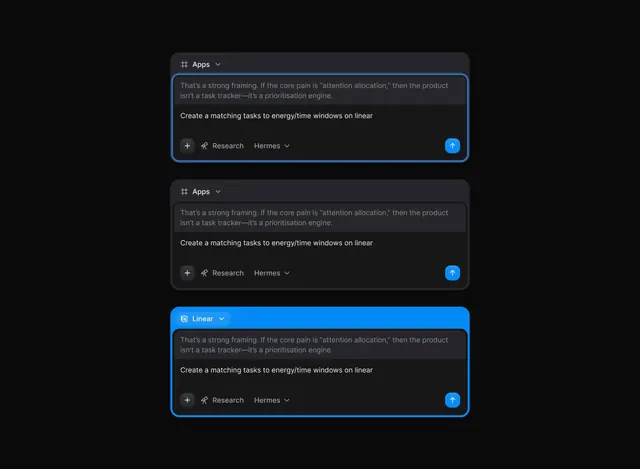
Dark-mode task interface card with blue accent border, expandable app selector, and conversation-style task input.
Summary
A dark-mode productivity interface showing three stacked task input cards with blue accent borders on hover states, each containing app-switcher dropdowns and action buttons.
Visual description
Three nearly identical cards on a black background. The top card has an active blue border and contains quoted research advice, followed by a task instruction in white sans-serif, a plus icon, "Research" label with icon, "Hermes" dropdown, and a filled blue circular send button. The middle card shows the same layout in an inactive state with a gray border and muted text colors. The bottom card is active again with a bright blue border and identical controls. Card styling uses small rounded corners and subtle padding to separate content layers.
Key takeaway
The hover/active state differentiation via border color (gray to bright blue) clearly signals interactivity without losing the minimal aesthetic. The inline app selector dropdown paired with an action button creates a compact task entry pattern. The stacked layout with generous vertical spacing makes each task feel distinct and reduces cognitive load.
Reuse notes
Excellent for productivity and research tool interfaces. The blue accent works best on true black backgrounds. The conversation-style input with secondary metadata (app, person) suits task managers and workflow tools. Preserve the generous card spacing to maintain the calm, focused feeling.
More like this

Keep what you find
A free account saves references to boards and can send you a weekly email of picks based on what you save.
To see every result, go Pro.