Preview image. Unlock full-res
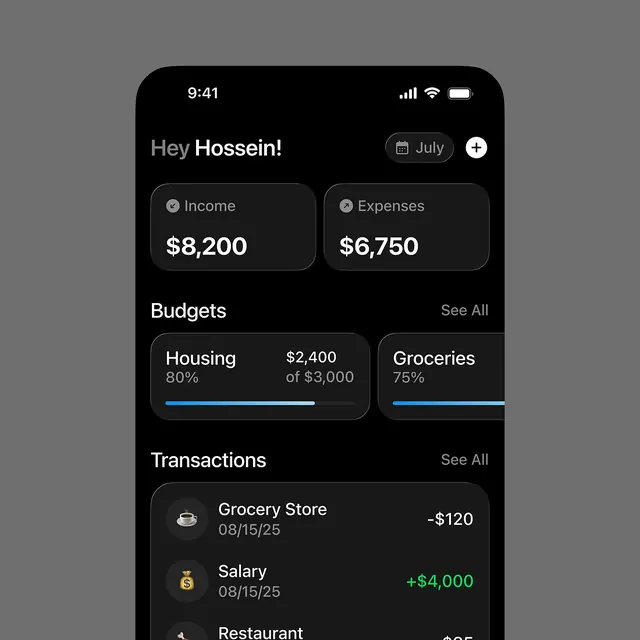
Dark-mode mobile app dashboard for personal finance, displaying income/expense totals, budget category cards with progress bars, and recent transaction list.
Summary
Dark-mode mobile app dashboard for personal finance, displaying income/expense totals, budget category cards with progress bars, and recent transaction list.
Visual description
A full-screen mobile app UI on a jet-black background (iPhone 14 style with notch visible). Greeting "Hey Hossein!" in gray and white typography with a calendar button and create-new button in the top-right. Two large cards below: Income ($8,200) and Expenses ($6,750) side-by-side with icon badges. Below that, a "Budgets" section showing two budget cards (Housing at 80% of $3,000 with a blue progress bar, Groceries at 75%) in a 2x2 grid layout. Bottom section shows "Transactions" with icon-prefixed entries: Grocery Store (-$120) with a coffee-cup icon and Salary (+$4,000 in green) with a dollar-bag icon. All text is light gray or white on dark charcoal cards. Blue accent color used for progress bars and positive values.
Key takeaway
The two-tier card hierarchy (large summary cards above, granular detail cards below); the icon-label-value transaction pattern; the use of subtle blue accent against dark neutrals for key data points; the clean vertical stacking that scrolls naturally on mobile.
Reuse notes
Reference for fintech and personal-finance product design, especially mobile-first apps targeting practical users. The dark mode suits evening usage and battery efficiency. The layout pattern scales well from overview down to transaction detail. Works for banking apps, expense trackers, and investment platforms.
More like this
Keep what you find
A free account saves references to boards and can send you a weekly email of picks based on what you save.
To see every result, go Pro.