Preview image. Unlock full-res
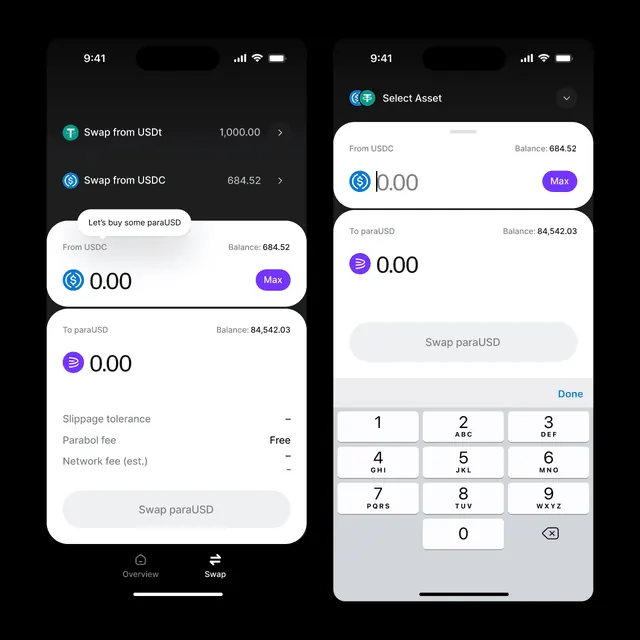
Dual-screen fintech swap interface showing USDT and paraUSD token exchange in dark mode with card-based input layers and numeric keypad.
Summary
Two screens of a cryptocurrency exchange interface: left panel shows swap transaction overview with fee breakdown, right panel shows asset selection and numeric keypad for input entry.
Visual description
Left screen on pure black background with navigation bottom bar (Overview / Swap tabs). Two text lines listing swap pairs with amounts (USDT, USDC, paraUSD), each line a gray text label with right-aligned numerical value and chevron. Below, a white card with rounded corners contains text input UI: "Swap from USDT" label, "0.00" input field with purple "Max" button, then a similar card below for "To paraUSD" with purple icon and balance amounts. Fee structure shown at bottom in light gray text on dark background. Right screen shows a modal overlay: "Select Asset" header with white card containing "From USDC" balance display ("684.52"), then large "0.00" input and purple "Max" button, followed by "To paraUSD" section showing purple icon and "0.00" entry. Bottom half is a numeric keypad (1-9, 0, backspace) in light gray on white grid.
Key takeaway
The card-based layering system (white containers on black background) creates clear input affordance without visual noise. Numeric keypad as a native mobile pattern beats traditional input fields for transactional confidence. The balance display paired with input field (USDC balance / input amount / paraUSD balance) creates an instant comparison mental model. Purple accent color for interactive elements (Max button, asset icons) stands out just enough against the monochrome palette without feeling loud.
Reuse notes
Essential reference for any DeFi or fintech swap/exchange interface. The dark background reduces eye strain in high-trading-activity scenarios. Card-based layout scales to multi-step flows (select from asset, enter amount, confirm, review, sign). Works best when trading pairs require frequent switching between tokens or chains. Numeric keypad is mobile-native; desktop versions should substitute traditional inputs to avoid clicking friction.
More like this

Keep what you find
A free account saves references to boards and can send you a weekly email of picks based on what you save.
To see every result, go Pro.