Preview image. Unlock full-res
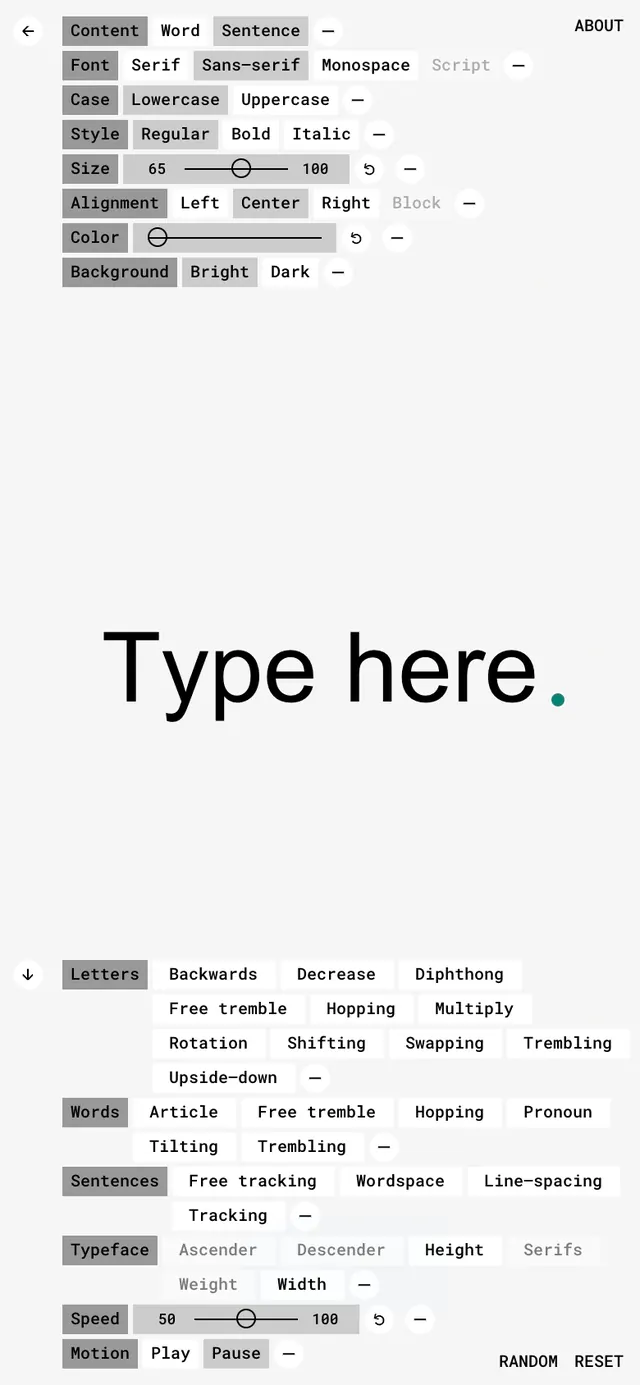
A web interface for interactive type control showing sliders and dropdowns for font selection, sizing, styling, alignment, color, and animation effects with live text preview.
Summary
An interactive typography application interface with labeled parameter controls (font, size, alignment, color, background, animation) arranged vertically above a centered text preview reading "Type here."
Visual description
Light gray interface with gray button controls and sliders. Top section shows tabs: Content, Word, Sentence; with Font dropdowns (Serif, Monospace, Script) and buttons for case selection (Lowercase, Uppercase). Size and alignment sliders with numerical inputs. Color picker circles. Background toggle (Bright/Dark). Lower section shows "Type here." in large display serif type as live preview. Below: additional parameter rows for letter modifications (Backward, Decrease, Diphthong, etc.) and word-level controls, ending with Speed and Motion toggles and Reset button.
Key takeaway
Transparent parameter architecture for typography; sliders and dropdowns for fine-tuned control; live preview as central feedback mechanism; accessibility-forward approach (dyslexia-friendly tool).
Reuse notes
Reference for design tools, creative software, or accessibility-first interfaces. Use for educational tech, type foundries, or design platforms. The control layout teaches parameter hierarchy. The minimal gray palette keeps focus on content, not chrome. Strong for professional/technical products.
More like this



Keep what you find
A free account saves references to boards and can send you a weekly email of picks based on what you save.
To see every result, go Pro.