Preview image. Unlock full-res
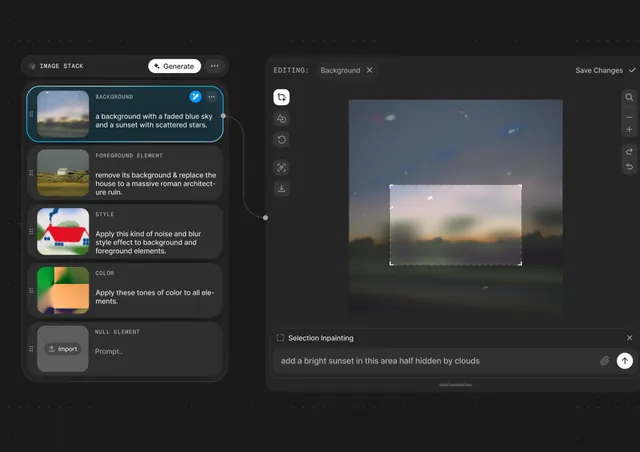
A dark-mode image-editing interface with a left sidebar of stacked instruction cards (Background, Foreground, Style, Color) and a large canvas showing an in-progress landscape edit.
Summary
A dark-mode creative editing interface where a left sidebar of instruction cards guides image manipulation, paired with a large canvas displaying a selected landscape in progress.
Visual description
Left sidebar labeled "IMAGE STACK" with a white Generate button and dropdown menu, containing five stacked instruction cards: BACKGROUND (sunset-faded sky with scattered stars), FOREGROUND ELEMENT (pastoral landscape with a house, instruction to remove and replace with a ruin), STYLE (color-noise blur effect preview), COLOR (warm orange-green tones swatch), NULL ELEMENT (placeholder with Import button). Each card has a small thumbnail and plain-English instruction text. Right half shows the main canvas: a landscape photograph with a faded blue sky, a sunset-lit meadow, and a house, selected with a dotted crop box; a "Selection Inpainting" panel at bottom-right invites users to "add a bright sunset in this area half hidden by clouds." All text is white on dark gray (#1A1A1A to #2F2F2F), with teal accent buttons and blue selection highlights. Monospace labels (uppercase) reinforce a technical tone.
Key takeaway
Stacked instruction cards create a clear, visual recipe for the edit workflow. Each card is self-contained and scannable. Plain-English instructions lower the barrier for non-technical users. Teal accents provide subtle visual cues without clutter. A large canvas on the right keeps focus on the image; the sidebar stays secondary. The dark background reduces eye strain during long editing sessions and makes selection highlights pop.
Reuse notes
Ideal for AI image tools, photo editors, or creative-automation platforms targeting both technical and non-technical users. The instruction-card pattern is excellent for guiding multi-step workflows. Works well for mobile or desktop given the clear sidebar-canvas split. Pair with real-time preview updates to maintain momentum.