Preview image. Unlock full-res
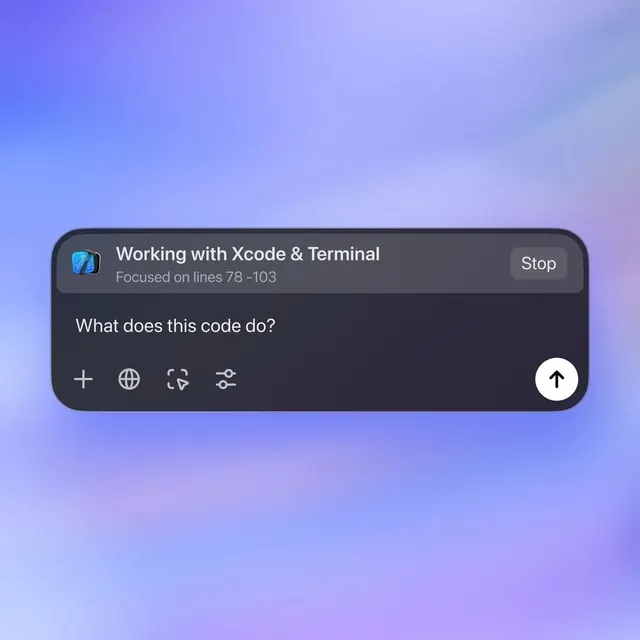
A code assistant modal floats over a soft blue-to-pink gradient, asking 'What does this code do?' with contextual action buttons for code inspection and settings.
Summary
A developer assistant modal overlay on a lavender-to-pink gradient background, with header showing task focus, centered copy prompt, and a row of four contextual action buttons plus a prominent submit button.
Visual description
Soft vertical gradient from bright periwinkle (top) through light lilac to soft pink (bottom) fills the entire background. A rounded dark charcoal modal sits centered: top bar with Xcode app icon, white headline "Working with Xcode & Terminal", gray subtext "Focused on lines 78-103", and right-aligned "Stop" button in white text. Main copy area asks "What does this code do?" in large white sans-serif. Below, a row of four light purple icon buttons with dark symbols (plus, globe, code-arrows, settings), and on the far right a large circular white button with upward arrow. All typography is clean, modern sans-serif with clear hierarchy through size and weight contrast.
Key takeaway
The soft gradient background (cool > warm fade) creates an inviting rather than clinical developer environment, lowering friction for repeated interaction. Iconographic buttons with tight spacing make actions discoverable without text bloat. The prominent up-arrow button (likely submit/send) is sized to guide focus, while a "Stop" escape route sits equally visible in the header, honoring developer autonomy.
Reuse notes
Ideal for developer tools, AI-assisted code editors, and command palettes where users toggle rapidly between tasks. The gradient background works especially well when the foreground UI must stay readable; test with actual code samples. The icon set here assumes familiarity with standard symbols; label them on first use if your audience is less developer-native.