Preview image. Unlock full-res
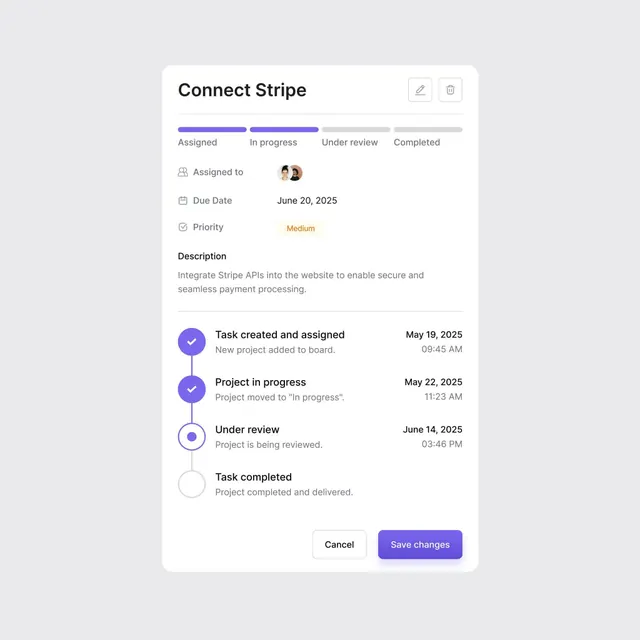
Project management modal showing a Stripe integration task with status tabs, metadata, activity timeline with checkpoints, and action buttons.
Summary
Modal task panel for a "Connect Stripe" integration with four status tabs, assigned-to avatars, due date and priority fields, a multi-checkpoint timeline, and primary/secondary action buttons.
Visual description
White rounded card on pale gray background. Header shows "Connect Stripe" title with edit and delete icons at top right. Below is a horizontal status tab bar with four states: "Assigned" (purple filled), "In progress" (purple filled), "Under review" (gray), "Completed" (gray, disabled). Metadata section shows assigned-to avatars (two profile images stacked), due date "June 20, 2025", priority "Medium" (orange label). A "Description" field contains task details about Stripe API integration. Below is a vertical timeline with four checkpoints: two completed (purple filled circles with checkmarks), one in-progress (purple ring), one pending (gray circle). Each checkpoint has a title ("Task created and assigned", "Project in progress", "Under review", "Task completed") with supportive text and timestamp. Footer has "Cancel" (outlined) and "Save changes" (purple filled) buttons.
Key takeaway
The horizontal status indicator bar at the top establishing workflow state at a glance. The compact metadata section efficiently displaying assigned users, dates, and priority in a grid format. The vertical timeline with checkpoint circles and descriptive text provides clear progress narrative without taking visual dominance.
Reuse notes
Perfect for project management, task tracking, and issue-tracking interfaces where users need to see task state, assignment, timeline, and take action. The modal format works for deep dives into detail. Status tabs suit linear workflows; timeline checkpoints work for onboarding flows and phased projects. Stripe as the example is incidental; adapt the label and description to any integration task.