Preview image. Unlock full-res
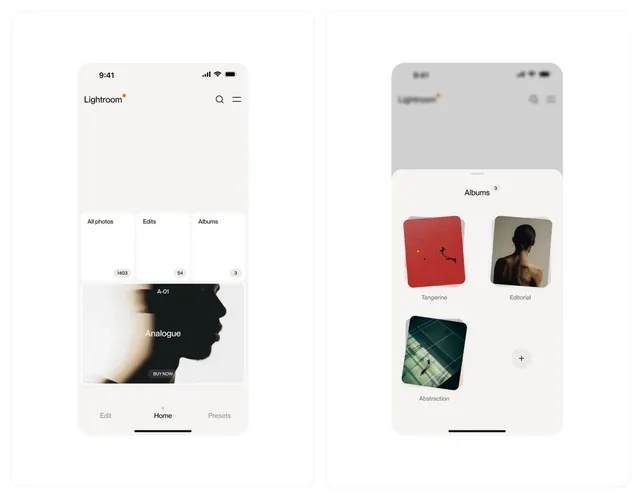
Dual-screen mobile photo app layout pairing an edit view with a full-screen image and tabbed navigation against an albums grid with card-based thumbnails.
Summary
Dual-screen mobile photo app layout pairing an edit view with a full-screen image and tabbed navigation against an albums grid with card-based thumbnails.
Visual description
Two side-by-side iPhone mockups. Left screen: "Lightroom" wordmark top-left, search and menu icons top-right. Below, three tabbed navigation buttons (All photos / Edits / Albums) with counts beneath each (103 / 54 / 3). A large featured image "A-01 Analogue" with a profile silhouette and "BUY NOW" button centered. Bottom navigation: Edit / Home / Presets. Right screen: gray status bar top, light background, "Albums" title with count badge (3). A 2x2 grid of album cards below: "Tangerine" (red thumbnail), "Editorial" (black profile), "Abstraction" (green geometric), and a plus button to add. Each card is rounded with a label underneath and subtle spacing. All type is sans-serif; the palette is nearly monochromatic (white, grays, black) with red and dark green as subtle accents.
Key takeaway
The gallery view's card grid system: consistent sizing, rounded corners, caption placement below each card, and the plus-button for action without a separate button bar. The left panel's tabbed count display as a quick-scan alternative to dropdown filters. The overall hierarchy of tabs > featured item > secondary view maintains focus while showing structure.
Reuse notes
Foundational pattern for photo-centric apps (editing, browsing, organizing). The two-column approach works on tablets or large screens; adapt to full-width stacking on phones. The tab-count method scales well when categories are fewer than five. Works best for apps where browsing and editing are equally important; if editing dominates, reduce the browse section's prominence.