Preview image. Unlock full-res
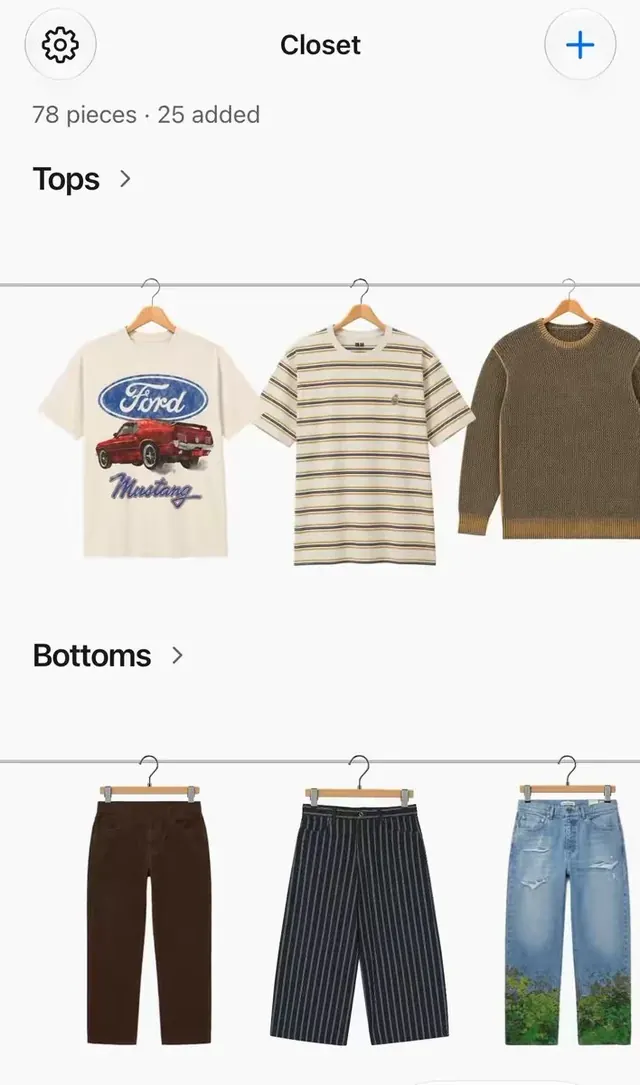
A clean mobile app UI for a digital wardrobe that organizes clothing by category, featuring smooth item-reveal animations as users browse their tops and bottoms.
More like this
See all
Summary
A clean mobile app UI for a digital wardrobe that organizes clothing by category, featuring smooth item-reveal animations as users browse their tops and bottoms.
Visual description
A white mobile screen titled Closet has a gear button at the left and a blue plus button at the right in round outlined circles, with a small gray count line beneath. Two sections labeled Tops and Bottoms in bold dark type with chevrons each show a thin horizontal metal rail with garments hanging from small hangers: a cream graphic tee, a striped tee and an olive knit on top, and brown trousers, navy pinstripe shorts and ripped jeans below. Each garment is a clean cutout photo on a plain white background, cropped at the right edge to suggest scrolling.
Key takeaway
Turn a category list into a visual metaphor by hanging cutout product photos on a rail per section, and let the last item bleed off the edge so the row invites a swipe.
Reuse notes
Reach for this as a ui screen reference. Pairs with minimal, clean directions. Original by thijs.