Preview image. Unlock full-res
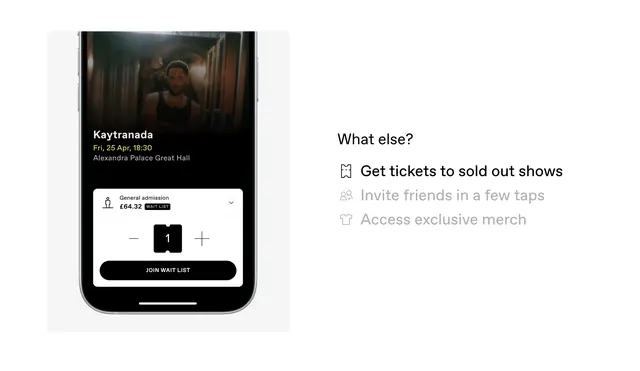
Mobile phone mockup showing a black-background ticket-purchase interface with event artist name, date/venue, quantity selector, and secondary action buttons.
Summary
A dark-mode mobile phone screen for event ticketing, displaying an artist portrait banner, event name, date and venue, quantity increment buttons, and secondary options for wishlisting, inviting friends, and merchandise access.
Visual description
Left side shows a phone frame with black background. Artist photo banner occupies the top third. Below: event name "Kaytranada" in white sans-serif, concert date "Fri, 28 Apr 19:30", venue "Alexandra Palace Great Hall" in smaller gray text. A prominent ticket quantity selector shows minus and plus buttons with a centered count (styled as a number in a small dark box). Below that: three right-aligned option links in light gray ("Join wait list", "Get tickets to sold out shows", "Invite friends in a few taps", "Access exclusive merch"). Right side labels the section "What else?" and repeats the three options as a checklist with icons.
Key takeaway
The quantity selector with large minus/plus buttons is tactile and mobile-friendly. Separating primary action (quantity) from secondary actions (wishes, invites, merchandise) keeps focus on the purchase intent. The dark background with white type and gray supplementary text creates clear visual hierarchy and reduces eye strain on mobile.
Reuse notes
Perfect for event, concert, and ticketing apps where users need quick quantity adjustment and multiple engagement paths (waitlist, friend invites, merchandise). The layout works best on mid-to-large phone screens. Dark mode is ideal for mobile-first designs that may be viewed in dim lighting. The secondary action list can be collapsed or hidden to reduce cognitive load on smaller devices.
More like this
Keep what you find
A free account saves references to boards and can send you a weekly email of picks based on what you save.
To see every result, go Pro.