Preview image. Unlock full-res
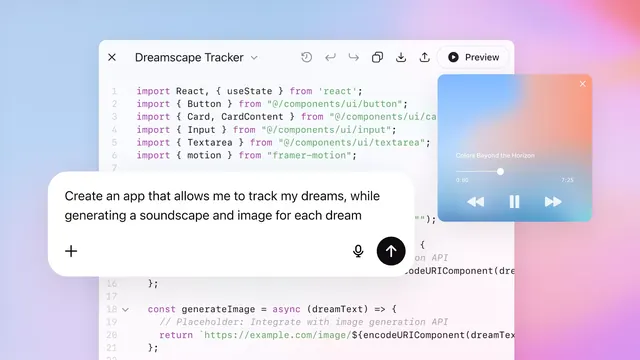
Web application interface layering a code editor with React imports, a soft pastel gradient background, and an overlaid music player widget with soft pink and blue tones.
Summary
Web application UI showing a code editor with monospace React imports overlaid on a soft blue-to-pink gradient, with a floating music player widget displaying a track titled "Colors Beyond the Horizon".
Visual description
Soft radial gradient background transitioning from light blue at top-left through pink and lavender to coral at bottom-right. Left side shows a code editor window with line numbers and syntax-highlighted JavaScript (React imports in purple and green). Center overlays a white rounded card containing left-aligned prose ("Create an app that allows me to track my dreams, while generating a soundscape and image for each dream") with a microphone icon and upward arrow button. Top-right corner contains a floating music player widget with rounded glass effect, displaying "Colors Beyond the Horizon" with playback controls (0:80 / 7:25) and play, pause, skip buttons. Overall composition balances technical precision (code, controls) with dreamy, creative visual softness.
Key takeaway
Pastel gradient backgrounds make technical content feel approachable rather than cold. Floating widgets (code editor, music player, text card) create layered depth without overwhelming. Monospace code type contrasts with rounded, friendly UI elements. Using a music player and dream-related copy establishes creative, generative AI aesthetic while maintaining developer credibility.
Reuse notes
Strong for creative developer tools, generative AI apps, music software, or productivity apps targeting creators and engineers. The gradient works across light themes. Scaling the number of overlaid panels can feel cluttered, so prioritize 2-3 focal points. Best when the code snippet is concise and readable (not full-screen scrolling).
More like this

Keep what you find
A free account saves references to boards and can send you a weekly email of picks based on what you save.
To see every result, go Pro.