Preview image. Unlock full-res
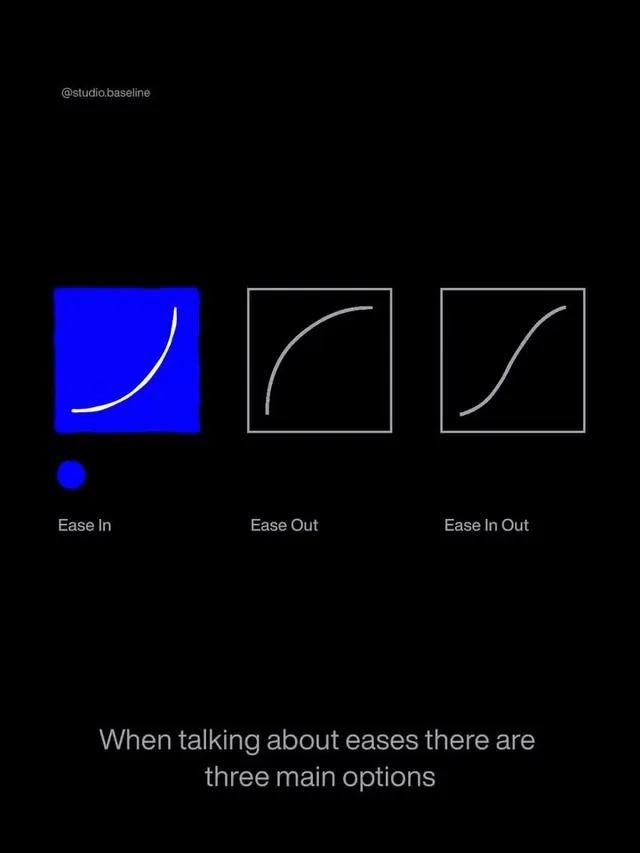
An educational diagram illustrating three animation easing functions (Ease In, Ease Out, Ease In Out) with a filled example and outlined comparison curves on a dark background.
Summary
A technical diagram showing three animation easing curves side by side on a dark background, with a bright blue filled example on the left and two outlined variants labeled Ease Out and Ease In Out, plus explanatory text.
Visual description
A black background with a small monospace label at the top left ("Ease In/Out Baseline"). Three boxes are arranged horizontally: the leftmost box has a bright indigo/electric blue fill with a white curved line inside, showing the primary easing example. The middle and right boxes are outlined in light gray with white curved lines inside, illustrating alternative timing functions. Below each box sits a label in light gray sans-serif: "Ease In", "Ease Out", "Ease In Out". A small solid blue dot appears below the leftmost box. At the bottom left, gray sans-serif text reads "When talking about eases there are three main options". A scattered grid of gradient-colored dots (white, purple, magenta, pink) is visible in the background, creating visual texture without competing with the foreground elements.
Key takeaway
The color coding system (bright fill versus outline) immediately distinguishes the primary example from comparison options. The three-column arrangement with consistent curves makes differences instantly readable. The dot grid in the background adds visual interest to negative space without introducing chaos. The small callout text grounds the diagram in a narrative context rather than presenting it as a bare reference.
Reuse notes
Essential for any developer-facing documentation, animation tutorials, or motion-design education. The dark background and high-contrast type ensure readability at small sizes in presentations or online docs. The technique scales well for explaining other technical concepts with multiple options or variants (easing functions, interpolation modes, timing strategies). Works well paired with code snippets or explanatory paragraphs.
More like this


Keep what you find
A free account saves references to boards and can send you a weekly email of picks based on what you save.
To see every result, go Pro.