Preview image. Unlock full-res
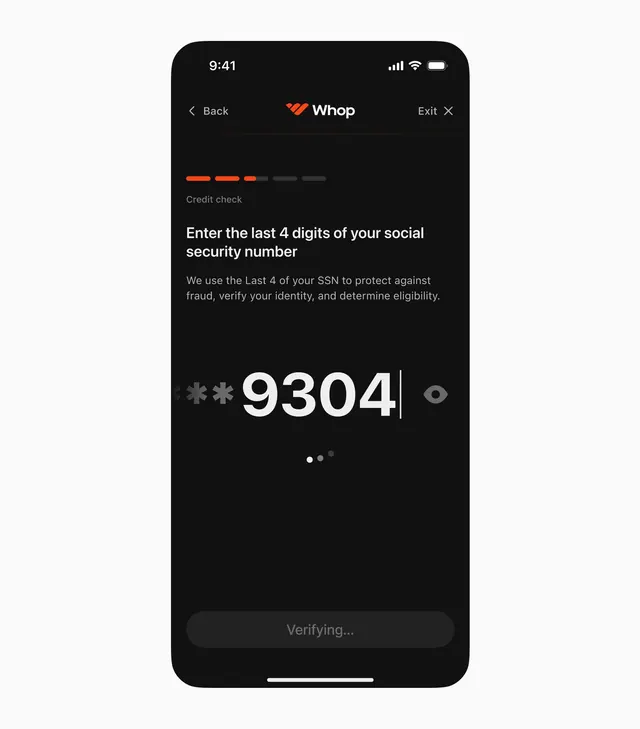
Dark mobile UI for a fintech identity verification step, asking for the last four digits of a social security number with a prominent masked input field.
Summary
Mobile identity verification screen for Whop displaying a credit check step with a large masked SSN input field against a near-black background, emphasizing security and clarity.
Visual description
Full-screen mobile interface with header showing "Back", "Whop" branding in orange and white, and an "Exit" button. A three-segment progress bar (two orange, one gray) indicates the credit check step. Main content: "Credit check" label, a bold white headline asking for the last four digits of social security number, and supporting copy explaining the fraud-protection purpose. Below: a prominent input field showing masked asterisks followed by "9304" and a visibility icon. Subtle interaction affordances (dots) below the input suggest additional form elements. A "Verifying..." button at the bottom in a darker shade. The composition is vertically centered, using white typography against the very dark background for maximum contrast and focus on the sensitive input.
Key takeaway
The use of extreme contrast (near-white on near-black) for critical security information. The progress bar positioned early establishes process context without clutter. The large, visible input field with clear instruction copy builds confidence in a sensitive interaction. The minimal secondary elements (status indicators, explanation text) support without distraction.
Reuse notes
Ideal for fintech onboarding, credit checks, or identity verification flows where security context and user confidence are paramount. The dark mode works well on modern mobile devices and can reduce perceived risk through visual clarity. Adapt for other sensitive multi-step verification processes.
More like this




Keep what you find
A free account saves references to boards and can send you a weekly email of picks based on what you save.
To see every result, go Pro.