Preview image. Unlock full-res
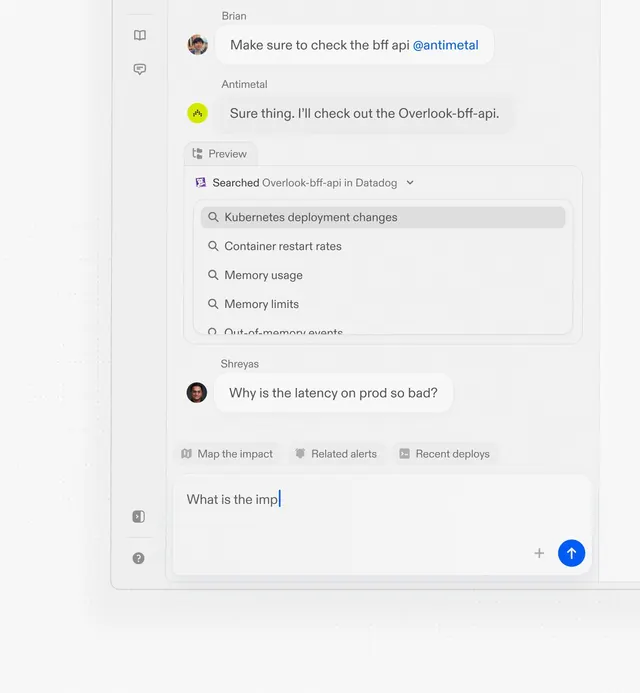
Chat-based DevOps troubleshooting interface with threaded conversations, search dropdowns, and a prominent blue call-to-action button for rapid navigation.
Summary
Chat-based DevOps troubleshooting interface with threaded conversations, search dropdowns, and a prominent blue call-to-action button for rapid navigation.
Visual description
A light, minimal interface for technical support conversations. Two primary chat messages (from Brian and Antimetal) appear in the upper half with circular user avatars and timestamps. Below, a collapsible dropdown menu labeled "Searched Overlook-bff-api in Datadog" reveals a list of Kubernetes and infrastructure-related search suggestions (deployment changes, container restart rates, memory usage, memory limits). A floating blue circular button anchors the bottom right. Left sidebar has three icons for navigation, rendered in a thin line style.
Key takeaway
The dropdown-as-expandable-search pattern, efficiently layering context within a chat. User avatars paired with short names for quick scanning. Threaded conversation flow with consistent left-to-right indentation. The floating action button (FAB) as the primary CTA without disrupting the message flow.
Reuse notes
Strong reference for developer tools, SaaS infrastructure dashboards, and support chat UIs where context switching between conversations and auxiliary search is frequent. The light palette works well for long-session reading. The structure assumes short, scannable messages; adjust spacing for longer content.
More like this
Keep what you find
A free account saves references to boards and can send you a weekly email of picks based on what you save.
To see every result, go Pro.