Preview image. Unlock full-res
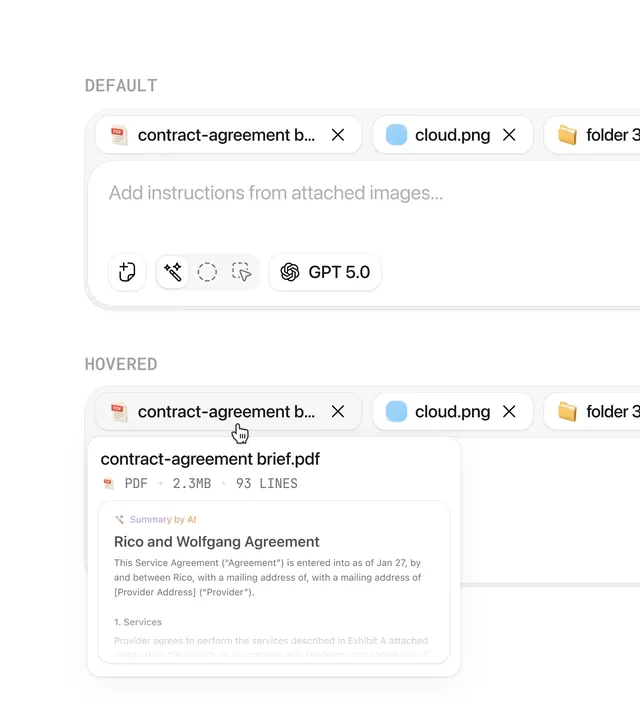
Minimal AI-powered document interface showing file tabs, attachment upload, instruction prompt, and AI model selection in a light, spacious layout.
Summary
Minimal AI-powered document interface showing file tabs, attachment upload, instruction prompt, and AI model selection in a light, spacious layout.
Visual description
Clean white background with generous vertical spacing. Top section shows a horizontal tab bar with three attached items: a PDF file (contract-agreement.pdf, marked with a red label), a cloud file, and a folder. Below, a large text input area with placeholder text "Add instructions from attached images..." and a toolbar of five icon buttons plus a prominent "GPT 5.0" model selector badge. The interface uses only sans-serif typography, neutral grays, and subtle divider lines. Two states are visible: default (empty) and hovered (showing a tooltip revealing the PDF filename and metadata). The layout prioritizes breathing room and readability over visual density.
Key takeaway
Minimal input interfaces with large whitespace feel less intimidating for complex tasks. File tab patterns with colored labels aid quick scanning. Keeping controls sparse and model selection visible (not hidden) invites confidence in AI tool choice. This layout pattern works for document, contract, or code analysis tools.
Reuse notes
Excellent template for SaaS document processors, legal tech, or AI content analysis platforms. The light palette suits collaborative tools. The file-tab pattern scales to multi-file upload. Spacing is generous, so it expects desktop-sized screens; mobile needs adjustment.
More like this


Keep what you find
A free account saves references to boards and can send you a weekly email of picks based on what you save.
To see every result, go Pro.