Preview image. Unlock full-res
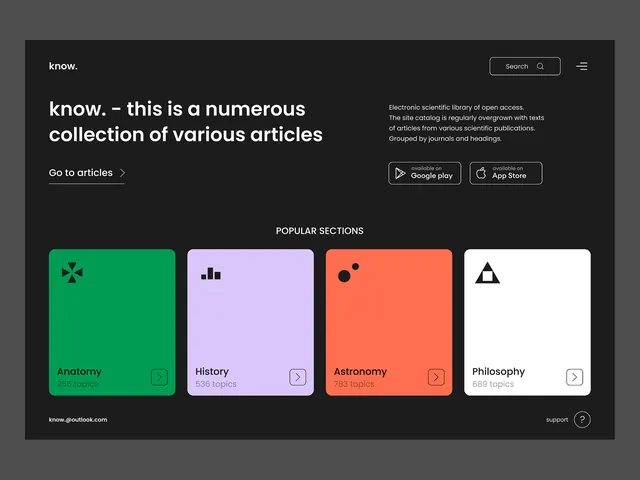
Dark-mode article library with four colorful category cards using vibrant accent colors against charcoal.
Summary
Dark-mode article library dashboard with four topic category cards rendered in a bright, vibrant palette (green, lavender, coral, white).
Visual description
A charcoal dark interface with centered header reading "know" and two-column layout below. Left column displays a large headline "know. - this is a numerous collection of various articles" followed by a secondary call-to-action link "Go to articles". Right column shows a concise description of the platform (electronic scientific library) and two app-download buttons. Below spans a full-width grid of four equally-sized category cards: a bright spring green card with mathematics icon and "Anatomy" label, soft purple card with bar-chart icon and "History", vibrant coral card with geometric circles and "Astronomy", and white card with minimalist triangle icon and "Philosophy". Each card includes topic count and right-arrow button. Footer shows email and support link. Top-right corner features search and menu icons.
Key takeaway
The four-card grid using single dominant colors per card creates clear visual separation and scanability without heavy borders. The contrast between dark interface background and bright card fills is highly legible and contemporary. Icon-plus-label-plus-count structure on each card provides hierarchy without clutter.
Reuse notes
Strong pattern for content libraries, knowledge bases, or app category browsing. Works well for publishing platforms, educational tools, and topic-based discovery flows. Dark theme pairs well with bright accent colors to emphasize categorical distinctions. Best with icon-focused category identifiers rather than text-only labels.
More like this



Keep what you find
A free account saves references to boards and can send you a weekly email of picks based on what you save.
To see every result, go Pro.