Preview image. Unlock full-res
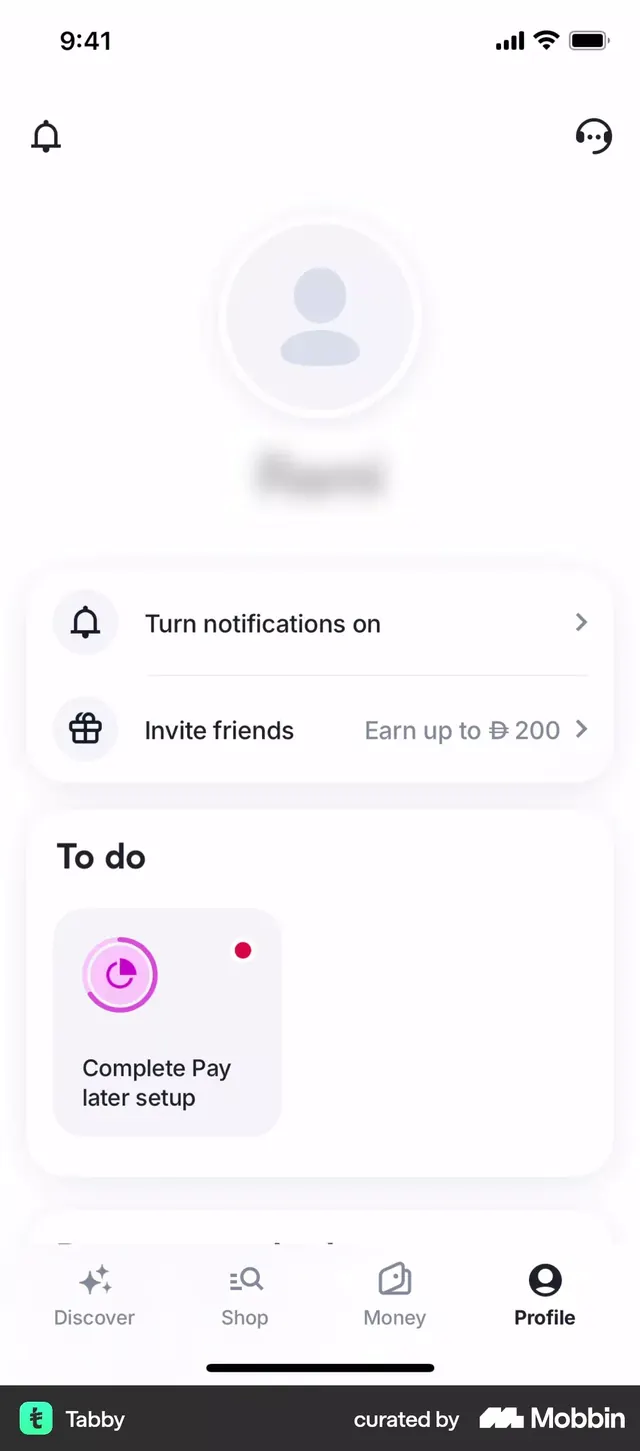
Mobile fintech UI showing a profile/account overview screen with gray placeholder avatar, action prompts for notifications and referral rewards, and a to-do section with onboarding task.
Summary
A fintech mobile profile screen featuring a clean empty-state placeholder, notification and referral prompts in white cards with icons, and an onboarding to-do section showing a single incomplete task with bright magenta progress indicator.
Visual description
Light gray background with white header showing status bar (9:41, signal icons). Large centered placeholder avatar area with gray concentric circles representing a user silhouette. Two white card buttons below: left shows bell icon with "Turn notifications on" text and arrow; right shows gift icon with "Invite friends / Earn up to 200" incentive text. Below is a "To do" section heading with a single pale gray card containing a magenta circular progress chart icon and text "Complete Pay later setup" with a red priority dot. Bottom of screen shows fixed navigation bar with five icons (Discover, Shop, Money, Profile active, and a menu). Simple sans-serif typography throughout in dark gray on light backgrounds.
Key takeaway
The generous white space and minimal visual weight create calm and trust; the magenta accent on the to-do card draws focus without overwhelming; the referral prompt with numeric incentive (earning amount visible) makes the offer concrete and action-inviting.
Reuse notes
Excellent template for fintech and payment apps using an onboarding pattern. The empty-state design avoids dead air by prompting users toward clear next actions (notifications, referrals, account setup). Works well for apps targeting first-time or inactive users needing gentle nudges toward engagement.
More like this




Keep what you find
A free account saves references to boards and can send you a weekly email of picks based on what you save.
To see every result, go Pro.