Preview image. Unlock full-res
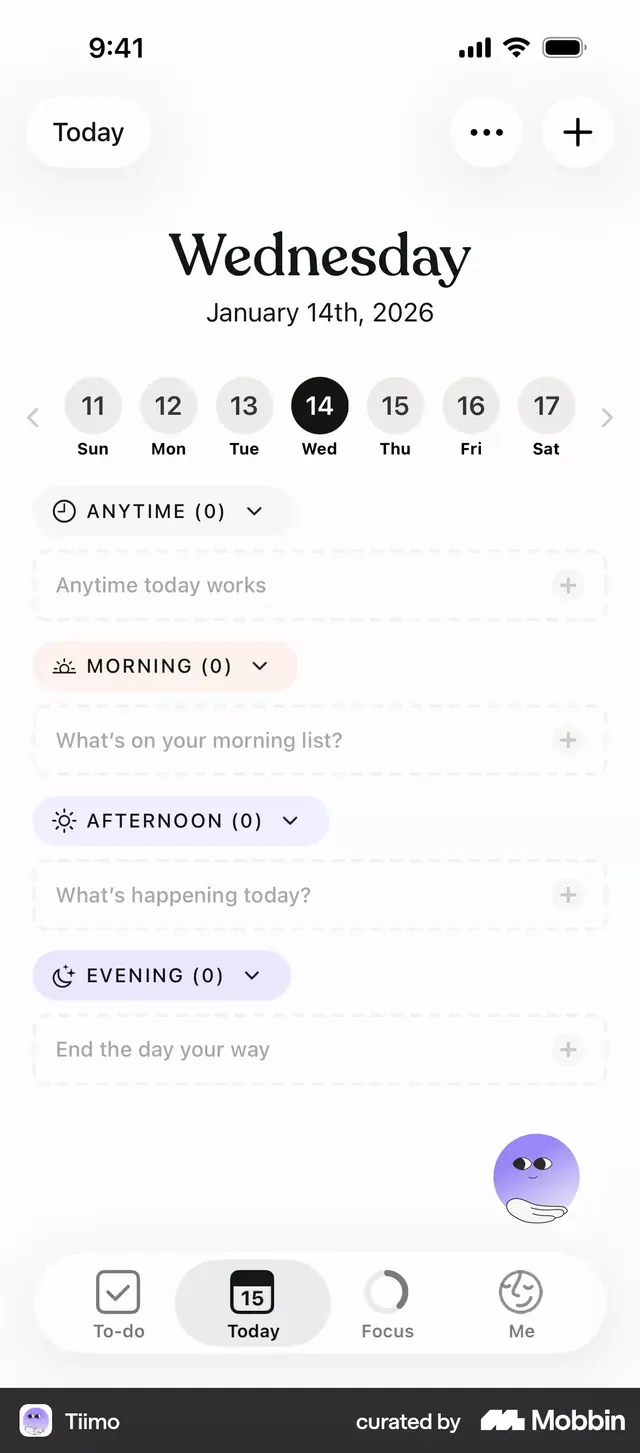
Mobile app task-planner interface with time-of-day sections (Anytime, Morning, Afternoon, Evening) and a minimal, light aesthetic.
Summary
Mobile task-planner interface organizing daily activities into time-of-day buckets (Anytime, Morning, Afternoon, Evening), with minimal color and soft icon labels.
Visual description
Full-screen mobile interface in portrait orientation. Top shows "Today" label with date "Wednesday January 14th, 2026" centered, backed by a 7-day date carousel (11-17) with the current day (14) highlighted in solid black. Below: four collapsible sections labeled "ANYTIME (0)", "MORNING (0)", "AFTERNOON (0)", and "EVENING (0)", each with a small icon (clock, sun, moon variations) and placeholder copy ("Anytime today works", "What's on your morning list?", etc.). Each section has a subtle background tint and a plus icon for adding tasks. Footer navigation bar has five icons: To-do, Today (highlighted), Focus, and Me. A purple animated mascot sits in the lower-right corner.
Key takeaway
The time-of-day section headers with icons and task counts, reducing cognitive load. The light tinted backgrounds (soft peach, lavender) distinguishing sections without strong contrast. The date carousel letting users jump between days while staying in the same weekly context.
Reuse notes
Strong pattern for habit trackers and daily planners. The placeholder copy is inviting without being pushy. Time-blocking structure works for any task-management or wellness app.
More like this


Keep what you find
A free account saves references to boards and can send you a weekly email of picks based on what you save.
To see every result, go Pro.