Preview image. Unlock full-res
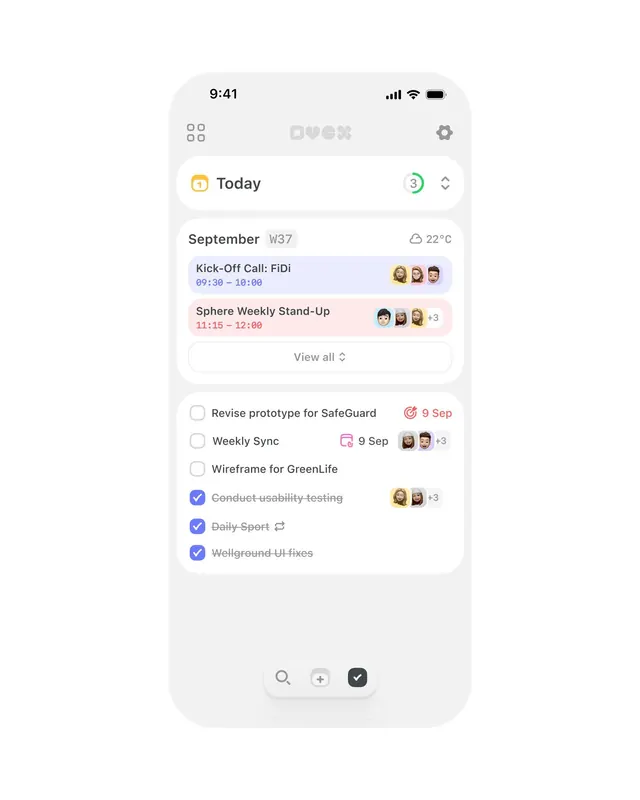
Clean mobile app interface for task management and calendar scheduling with color-coded event cards, checklist items, and accent icons in a light palette.
Summary
Mobile app screen displaying a combined calendar and task list interface with time-blocked events in pastel color blocks, small participant avatars, completed task checkboxes, and a floating bottom toolbar for quick actions.
Visual description
iPhone frame showing status bar with time (9:41), signal, Wi-Fi, and battery icons. Below, a tab bar with "Today" (active, orange calendar icon) shows a green notification badge ("3"). Content area displays "September W37" with 22C weather icon. Two color-blocked event cards follow: first (blue) reads "Kick-Off Call: FiDi 09:30-10:00" with three small participant avatars; second (pink) reads "Sphere Weekly Stand-Up 11:15-12:00" with avatars and a "+3" indicator. A "View all" link appears below. Task list includes three unchecked items (tasks for "Prototype," "Weekly Sync," "Wireframe") and three checked items in blue with strikethrough text. Small circular avatars mark team members. Bottom navigation features search, add, and checkmark action buttons in light gray and dark accents.
Key takeaway
The pastel color-blocked time-block pattern for calendar events; the compact avatar stack with "+N" overflow indicator for team collaboration cues; the low-ink checklist styling (understatement, not visual noise); the persistent floating-button toolbar for quick task creation.
Reuse notes
Core pattern for productivity and calendar apps targeting collaborative work teams. Light palette suits all-day screen use without fatigue. Pastel event colors provide visual distinction without aggressive saturation. Scale avatar groups and "+3" treatment for different team sizes.
More like this
Keep what you find
A free account saves references to boards and can send you a weekly email of picks based on what you save.
To see every result, go Pro.