Preview image. Unlock full-res
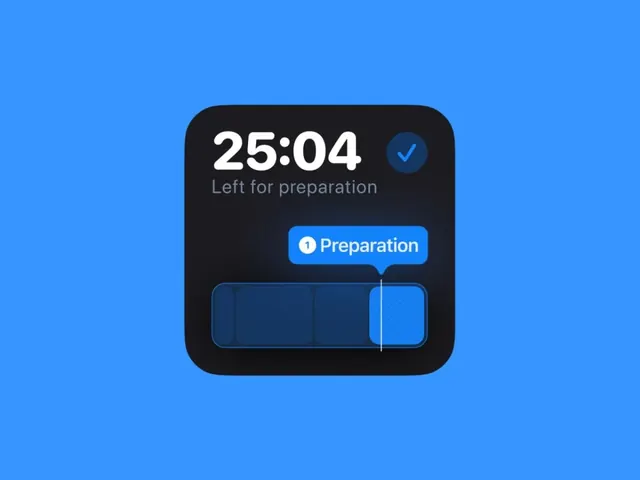
A mobile app timer interface showing 25:04 countdown in a dark rounded card on a bright blue background, with activity status label and progress bar.
Summary
A mobile timer widget in a dark card with white time display (25:04), a status label, action button, and horizontally-stacked progress bar, positioned centically on a bright cobalt background.
Visual description
Bright electric blue background (approximately #3695FF) fills the entire canvas. Centered on it: a dark rounded rectangle card (charcoal/near-black, #1C1B20) with substantial corner radius and soft shadow. Inside the card, top section contains large white sans-serif numerals "25:04" with a small checkmark icon in a blue circle to the right. Below: muted gray text "Left for preparation". A bright blue button labeled "1 Preparation" with white text and rounded corners. At bottom: a horizontal segmented progress bar showing four sections, one highlighted in bright blue. All text rendered in clean, modern sans-serif. Overall ratio is portrait-oriented widget on landscape background, implying this is a mobile-first design mockup.
Key takeaway
The high-contrast background makes the card pop; the bright blue accent on the dark widget creates visual focus. The combination of large time numerals and small status text creates hierarchy. The progress bar uses color differentiation rather than fill to indicate progress state. The design signals urgency and focus through its minimal, focused composition.
Reuse notes
Ideal reference for productivity apps, fitness timers, or any interface where countdown or phase-based progress is central. The dark-on-bright color inversion is striking for mobile and web. Works well for applications emphasizing focused work or interval-based activities.
More like this


Keep what you find
A free account saves references to boards and can send you a weekly email of picks based on what you save.
To see every result, go Pro.