Preview image. Unlock full-res
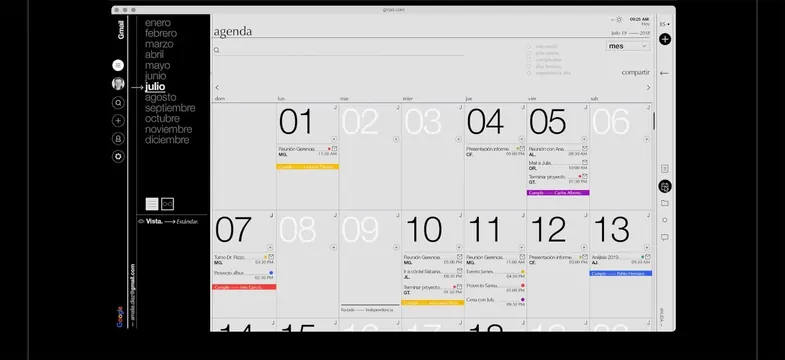
Minimalist monthly calendar showing a 7x6 grid of date cells with variable-height color-coded event bars, left navigation panel, and neutral grey palette.
Summary
Gmail calendar interface displaying a single month in a 7x6 grid with color-coded event bars, a left-panel month selector and account controls, rendered in neutral greys and whites.
Visual description
A Gmail calendar application window in Spanish showing the month view of July. Dates are arranged in a standard grid with column headers (dom, lun, mar, etc.). Each day cell contains the date number in large type and stacked color-coded event bars indicating meetings or tasks (yellow, orange, purple, red bars with abbreviated text and times). A narrow dark sidebar on the left displays month names as a vertical list, with July highlighted, plus profile, search, and settings icons. The top header shows standard browser chrome and Gmail folder/option labels. The overall palette is light grey backgrounds with black and dark grey text, creating a calm, information-dense interface.
Key takeaway
Color-coded event bars can display multiple overlapping items in minimal space while remaining scannable. Stacking events vertically within a date cell avoids horizontal overflow. The left panel serves navigation and account controls simultaneously without taking main content space.
Reuse notes
Works for any calendar, scheduling, or time-management interface where multiple events per day are common. The color system should use 5-8 distinct colors that remain distinguishable in small bars. Grid-based month view scales well to responsive layouts and mobile (via reflow). Pairs naturally with week and day views, and list or agenda sidebars.
More like this
Keep what you find
A free account saves references to boards and can send you a weekly email of picks based on what you save.
To see every result, go Pro.