Preview image. Unlock full-res
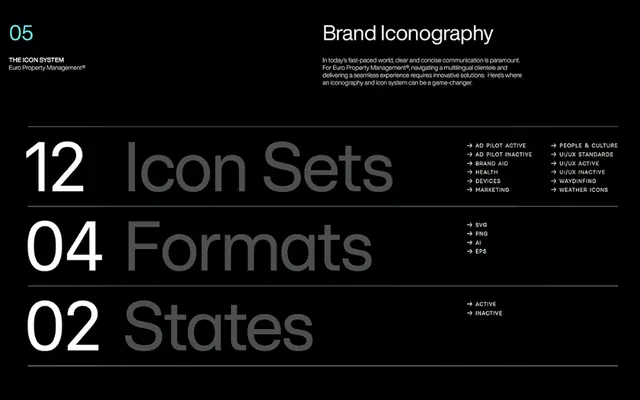
A technical reference slide showing the organizational structure of an icon system with 12 icon sets, 4 export formats, 2 state variations, and documented use cases.
Summary
A technical reference slide documenting an icon system, breaking down 12 icon sets grouped by category, 4 export file formats, 2 state variations (active/inactive), and specific use-case icons (weather, people, health, devices, warning).
Visual description
Black background with white and gray typography arranged in a strict hierarchical grid. Top section reads "05" and "Brand Iconography" in sans-serif, introducing "THE ICON SYSTEM" with brief explanatory text. The main content is segmented into three labeled rows: "12 Icon Sets" (white text, with associated categories: AD Flight Active, Flight Inactive, Health, Devices, Warning, People & Culture, User Standards, Features, Health Inactive, Wayfinding, Weather Icons); "04 Formats" (gray text, listing: SVG, PDF, AI, EPS); "02 States" (gray text, showing: Active, Inactive). Horizontal divider lines separate sections. Right margin lists all categories as a checklist-like reference. Clean, high-contrast monochromatic treatment prioritizes legibility and systematic information architecture.
Key takeaway
The use of numbered hierarchies and category groupings to document system scope clearly; the checklist-style right margin as a quick-reference inventory; strict monochromatic treatment with generous whitespace to support complex categorical information without visual noise.
Reuse notes
Ideal for design system documentation slides, icon library catalogs, or any technical specification that requires clear enumeration of components and variants. Works best for internal or B2B audiences familiar with design systems terminology.
More like this



Keep what you find
A free account saves references to boards and can send you a weekly email of picks based on what you save.
To see every result, go Pro.