Preview image. Unlock full-res
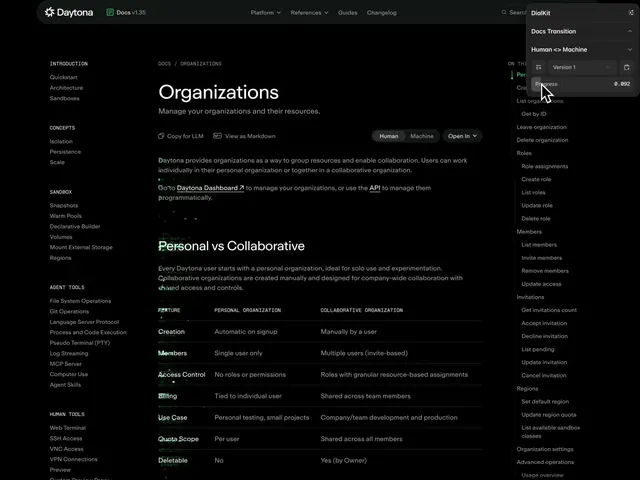
A glitchy animated transition for Daytona Docs that morphs raw markdown text into a fully rendered documentation page, toggled between human-readable and machine-rendered views.
More like this
See all
Summary
A glitchy animated transition for Daytona Docs that morphs raw markdown text into a fully rendered documentation page, toggled between human-readable and machine-rendered views.
Visual description
A documentation website displays an Organizations page with a prominent toggle at the top right labeled Human to Machine indicating the current view state. Left sidebar contains navigation items, center area shows a comparison table with feature rows, and a floating panel on the right reinforces the mode toggle. Dark theme interface uses green accent text for interactive elements and white type for content.
Key takeaway
Place a persistent mode toggle as a top-level navigation element to let users flip between two complementary views of the same content, making documentation adaptable to different expertise levels within a single interface.
Reuse notes
Reach for this as a motion still reference. Pairs with typographic, experimental directions. Original by Robert Pavlinić.
More like this

Keep what you find
A free account saves references to boards and can send you a weekly email of picks based on what you save.
To see every result, go Pro.