Preview image. Unlock full-res
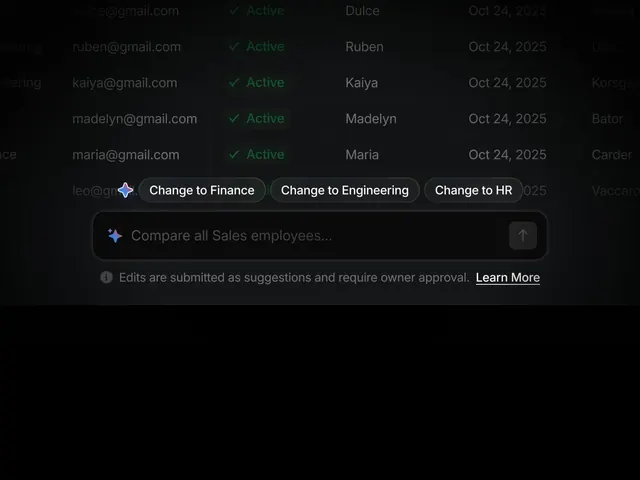
Employee roster table with dark background, green status indicators, and department-filter buttons for switching between HR, Finance, and Engineering teams.
Summary
Dark-themed employee table with a column-based grid layout showing email, active status (green checkmarks), names, and dates, plus department-filter tabs and an AI comparison bar.
Visual description
Five employee rows stacked in a dark charcoal table, each with left-aligned email address, a green checkmark label "Active", a name (Ruben, Kaiya, Madelyn, Maria), and a date (Oct 24, 2025). Above the table, three pill-shaped buttons labeled "Change to Finance," "Change to Engineering," and "Change to HR" let users filter by department. Below the table sits a search bar with the prompt "Compare all Sales employees..." and a small up-arrow button. At the bottom, a gray information box states "Edits are submitted as suggestions and require owner approval" with an underlined "Learn More" link.
Key takeaway
The dark background reduces eye strain during data-heavy work. Green status indicators (checkmarks) leverage color to convey active/inactive states without adding extra columns. Department-filter buttons above the table let users pivot the view without navigating to a separate filter panel, keeping context and scrolling to a minimum.
Reuse notes
Strong pattern for internal HR, sales, or team-management dashboards. Works especially well when users need to quickly compare or reassign staff across departments. The status-indicator treatment pairs well with approval-required workflows and collaborative admin tools.