Preview image. Unlock full-res
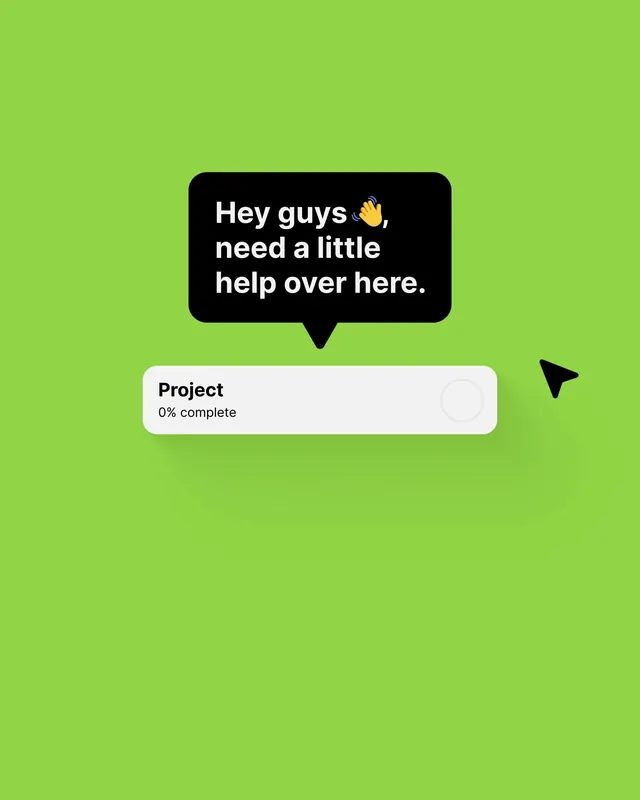
A full-screen UI with a bright lime-green background, black rounded chat bubble containing a casual help request with emoji, and a white progress card below.
Summary
A full-screen UI with a bright lime-green background, black rounded chat bubble containing a casual help request with emoji, and a white progress card below.
Visual description
Bright lime-green background fills the entire viewport. Centered mid-screen is a large black rounded rectangle (chat bubble) with white text reading "Hey guys, need a little help over here." accompanied by a waving-hand emoji. Below sits a white rounded card with "Project" in bold sans-serif and "0% complete" in smaller text, suggesting an empty or newly started progress state. A black arrow cursor sits to the right side, implying clickability. The composition is tightly centered, leaving ample green breathing room on all sides. The high contrast between black and green, white and green makes every element instantly legible.
Key takeaway
Lime-green as a full-screen backdrop works for attention-grabbing moments (help requests, empty states, confirmation dialogs). A chat bubble with conversational language and emoji breaks formality and reduces perceived friction. The white card below provides a soft pause point, guiding the eye to secondary information without competing for focus.
Reuse notes
Use for onboarding help prompts, empty states, or tutorial cues where you want personality and approachability. The high contrast reads well at mobile sizes and in reduced light. Avoid overusing the bright green across many screens (reserve it for moments of emphasis). The conversational tone suits consumer apps and community platforms; use sparingly in financial or legal contexts.