Preview image. Unlock full-res
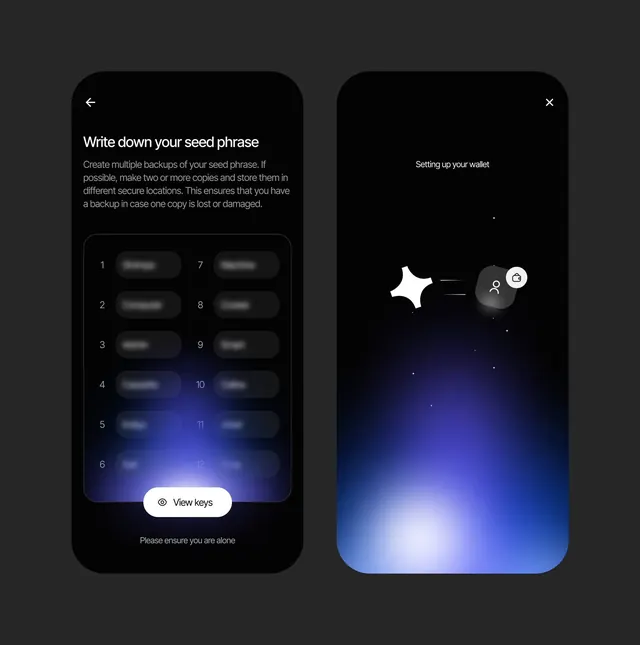
Two-screen dark-mode wallet onboarding flow, left showing a numbered seed-phrase entry grid with security warnings, right depicting an animated setup screen with radial gradient glow and floating icons.
Summary
A two-stage wallet setup experience: the left screen teaches seed-phrase backup via a numbered grid with blurred words and security instructions, while the right screen transitions into an animated setup state with floating icons and a radial blue gradient emanating from the bottom.
Visual description
Left screen: Dark background (near-black) with a headline "Write down your seed phrase" in white sans-serif, followed by a paragraph of setup instructions. Below is a 2x6 grid of numbered fields (1-12), each containing blurred text (for privacy) with two fields (4 and 11) highlighted in a soft blue glow, indicating focus or input state. A white rounded button labeled "View keys" sits at the bottom, paired with a small warning in light gray: "Please ensure you are alone". Right screen: Dark background transitioning into a radial gradient of deep indigo and light blue, centered and glowing upward from the bottom. A "Setting up your wallet" headline at top-right, with floating white and gray circular icons (user profile, wallet bag) in the center and scattered small white dots. A back arrow and close button frame the top corners. The overall mood is secure and procedural, balancing clarity with privacy emphasis.
Key takeaway
The blurred seed-phrase grid removes the temptation to read during setup and emphasizes the ritual of handwriting. The gradient glow on the right screen is purely decorative but builds confidence and momentum through the flow. The color accent (blue glow) is minimal and surgical, drawing attention only where needed. The security warning ("Please ensure you are alone") is matter-of-fact and integrated, not alarming.
Reuse notes
Perfect for any crypto wallet, key-management, or sensitive-data onboarding flow. The blur technique is reusable for any credential entry where you want to discourage digital capture. The right screen's gradient is calming but can feel slow in fast-paced environments; test duration expectations. Works best across the full wallet setup experience; showing only one screen loses the narrative of the two-step process.