Preview image. Unlock full-res
Dark two-column feature with gradient-backed cards showing agent builder setup and an Atlas AI copilot chat for effortless updates.
Summary
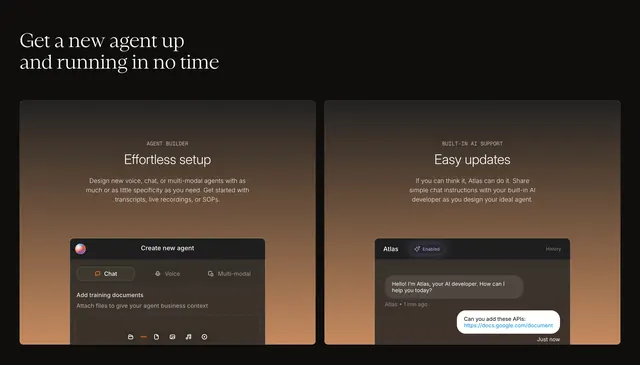
Get a new agent up and running in no time headline over two side-by-side gradient cards that demo effortless agent creation and an in-product AI developer chat.
Visual description
Deep black page with a large white serif headline anchored top left. Two equal rounded cards sit below, each on a vertical gradient from dark charcoal to warm burnt orange. Left card labels AGENT BUILDER in small caps, titles Effortless setup, and describes designing voice, chat, or multi-modal agents from transcripts or SOPs; embedded UI shows Create new agent with Chat, Voice, and Multi-modal tabs and an Add training documents drop zone with dashed border and file-type icons. Right card labels BUILT-IN AI SUPPORT, titles Easy updates, and describes chatting instructions to Atlas; embedded chat UI shows Atlas with an Enabled sparkle badge, a greeting message, and a user bubble asking to add APIs with a Google Docs link.
Key takeaway
Gradient-filled feature cards make dark sections feel premium without photography. Pair a setup form mock with a conversational copilot mock to sell both self-serve and assisted onboarding. Caps micro-labels over sans titles keep hierarchy crisp inside cards.
Reuse notes
Ideal for AI builder products with a guided setup story. Both cards need believable UI content. Orange-brown gradients read warm and enterprise; adjust for lighter brands. Two-column layout should stack on narrow viewports.