Preview image. Unlock full-res
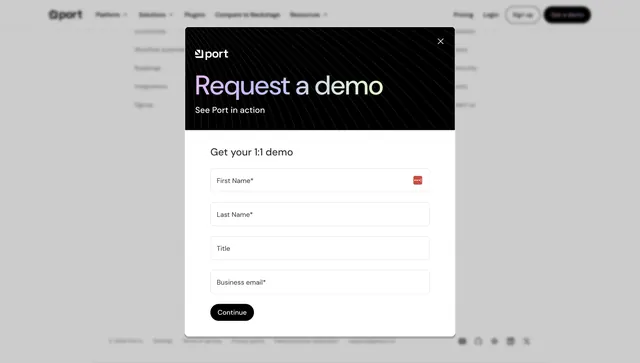
Centered demo-request modal over a dimmed page, with a dark gradient header and a white multi-field lead form.
Summary
A centered "Request a demo" modal floating over a dimmed page, splitting a dark gradient-text header from a clean white form with four lead-capture fields.
Visual description
Behind a faint grayed-out page (Port navbar and footer barely visible), a centered rounded modal sits with a close X top-right. Its upper block is a black panel with faint diagonal line texture, the Port logo, and an oversized "Request a demo" headline rendered in a soft lilac-to-mint gradient, with "See Port in action" beneath. The lower block is white: a bold "Get your 1:1 demo" label over four stacked outlined inputs (First Name*, Last Name*, Title, Business email*), the first showing a small red required indicator. A filled black "Continue" button anchors the bottom left, implying a multi-step form.
Key takeaway
The split modal, dark gradient-text header over a clean white form, separates brand expression from the functional task so the fields stay easy to scan. A "Continue" button rather than "Submit" signals a short multi-step flow that feels lighter than one long form. Dimming the page focuses all attention on the modal.
Reuse notes
Use for a sales-led B2B product where booking a demo is the primary conversion. Keep required fields minimal as shown so the first step feels quick. The gradient header needs a dark base to read; pair with the page's existing nav so the overlay feels in-context rather than a separate page.