Preview image. Unlock full-res
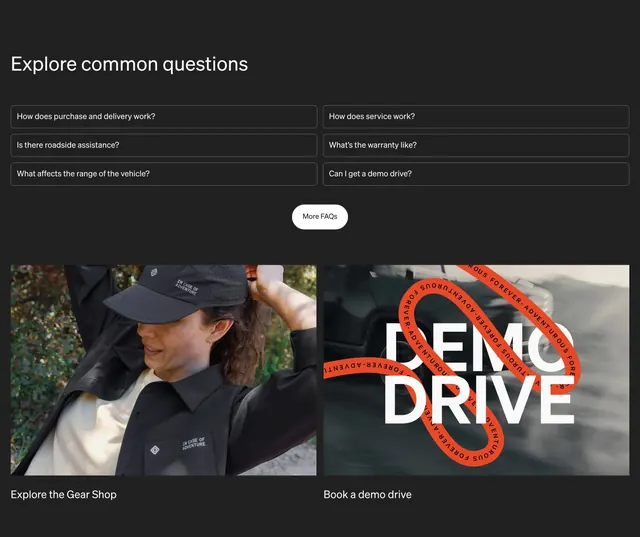
Dark FAQ grid with bordered question rows, a More FAQs pill CTA, and two large image cards for Gear Shop and demo drive below.
Summary
Dark FAQ grid with bordered question rows, a More FAQs pill CTA, and two large image cards for Gear Shop and demo drive below.
Visual description
Dark charcoal background with large white Explore common questions heading top left. Six FAQ rows in a two-column grid: each is a wide dark rectangle with a thin light border and white question text (purchase and delivery, roadside assistance, range, service, warranty, demo drive). Centered white pill More FAQs button with black text sits below the grid. Bottom half: two side-by-side image cards. Left shows a person in Rivian cap and jacket with IN CASE OF ADVENTURE copy and Explore the Gear Shop label. Right is a stylized DEMO DRIVE graphic with bold white type, blurred vehicle background, and looping orange ribbon repeating FOREVER ADVENTUROUS, labeled Book a demo drive.
Key takeaway
FAQ rows stay flat and bordered instead of heavy accordion chrome, keeping the grid scannable on dark backgrounds. Pairing support questions with merch and demo-drive cards turns the bottom of the page into conversion paths, not just answers.
Reuse notes
Use for automotive or D2C product pages where buyers need reassurance before purchase. The dark FAQ block contrasts well after light feature sections. Orange accent card adds energy without recoloring the whole section.
More faq sections
See all
More like this

Keep what you find
A free account saves references to boards and can send you a weekly email of picks based on what you save.
To see every result, go Pro.