Preview image. Unlock full-res
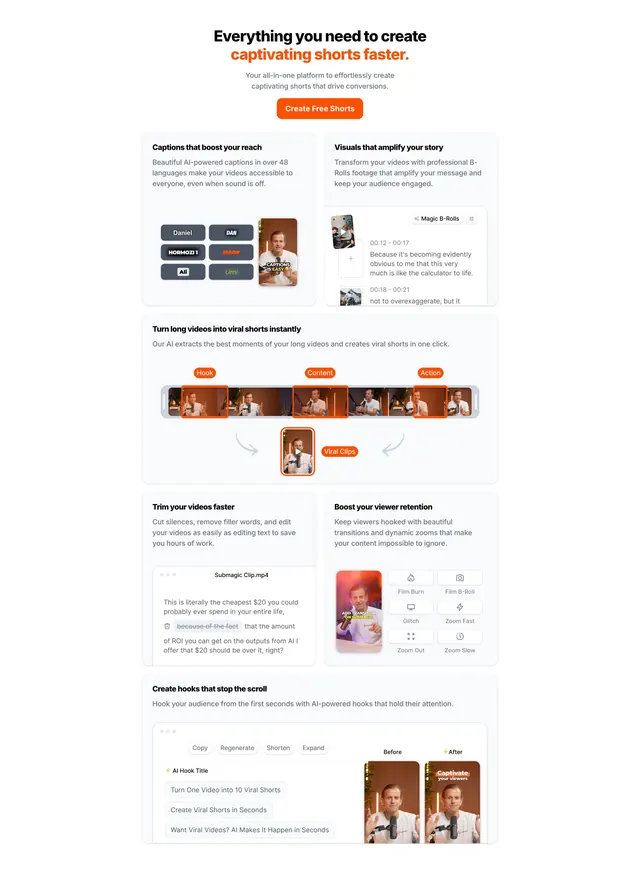
Light bento-style feature section mixing two-up cards and a full-width timeline mockup, each cell showing the video editor in action.
Summary
A light bento feature section for a short-form video tool, alternating two-up feature cards with a full-width timeline mockup. Every cell shows a fragment of the actual editor so the benefits are demonstrated rather than stated.
Visual description
A centered two-line heading (black plus orange "captivating shorts faster.") sits over a subhead and an orange "Create Free Shorts" button. Below, cards of mixed widths form a bento: a top pair (caption-style chips beside a vertical video, and a "Magic B-Rolls" timecode panel), then a full-width card showing a horizontal video timeline with Hook/Content/Action segments funneling down to a single "Viral Clips" output, then another pair (a transcript-editing card with strikethrough text, and a grid of zoom/film-effect buttons beside a vertical clip), and a bottom card with AI hook-title suggestions and a before/after thumbnail pair. The palette is white and light grey with a consistent orange accent.
Key takeaway
The mixed-width bento lets a long feature list breathe, with one wide cell (the long-video-to-shorts timeline) acting as the hero moment among smaller supporting cards. Each cell embeds a real slice of the product UI, so the section sells by demonstration. A single orange accent ties varied content together.
Reuse notes
Ideal for consumer-creator software with many small features that are easier to show than describe. The bento only works if you have genuine UI fragments to populate cells; placeholder graphics would expose the format. Reserve the full-width cell for the single most important workflow.