Preview image. Unlock full-res
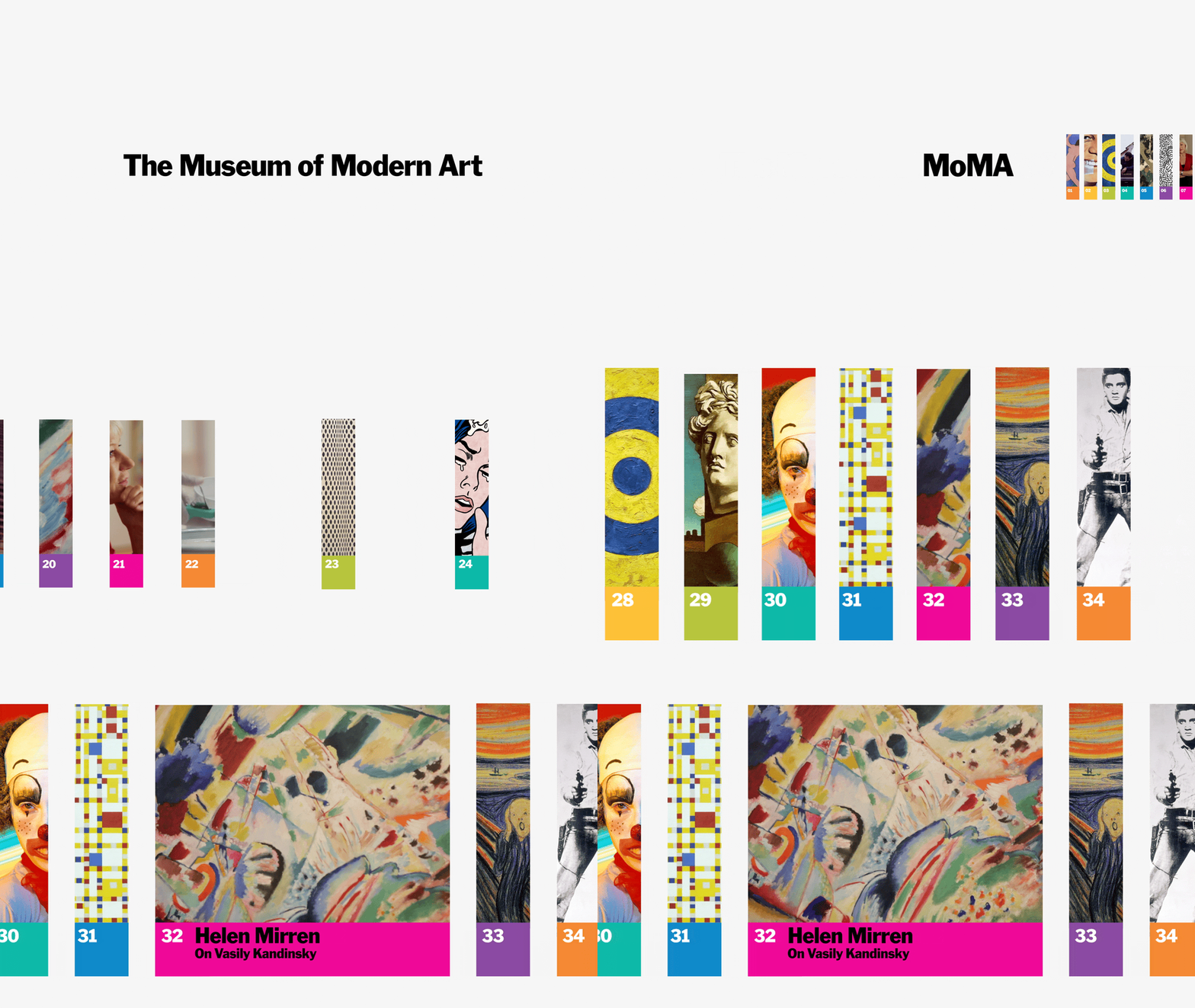
An animated museum identity that opens on a bold The Museum of Modern Art wordmark, then scrolls a horizontal row of numbered color-tabbed panels framing famous artworks.
Summary
An animated brand sequence for a modern-art museum: it begins with the centered wordmark "The Museum of Modern Art" in heavy black sans-serif on off-white, then dissolves into a horizontally scrolling row of tall numbered panels, each a cropped famous artwork with a colored index tab.
Visual description
Frame one is nearly empty: only "The Museum of Modern Art" set centered in a bold black grotesque on a warm off-white ground. The animation then pushes into a filmstrip of narrow vertical panels marching left, each panel a tight vertical crop of a different artwork (a Mondrian grid, Munch's screaming figure, a Kandinsky abstraction, a classical bust, a clown portrait) and footed by a large index number in a saturated color tab (magenta, orange, yellow, teal, blue). One highlighted panel expands to add a magenta caption block with a title and subtitle in white. The palette stays neutral off-white in the chrome and lets the artwork crops supply all the color.
Key takeaway
The numbered color-tab panel system: a single repeatable module (vertical art crop plus a colored number footer) turns a varied collection into one coherent, browsable index, and the same module animates as a horizontal scroll. Holding the wordmark alone on near-empty space first gives the reveal weight before the color arrives.
Reuse notes
A template for any collection brand (museum, archive, catalog, festival lineup) that needs to present many disparate items as one system. The colored index tabs double as a navigation and as the only color source, so the surrounding layout can stay neutral. Caveat: it depends on strong, recognizable crops; weak imagery makes the grid feel like stock thumbnails. </content>
More like this





Keep what you find
A free account saves references to boards and can send you a weekly email of picks based on what you save.
To see every result, go Pro.