Preview image. Unlock full-res
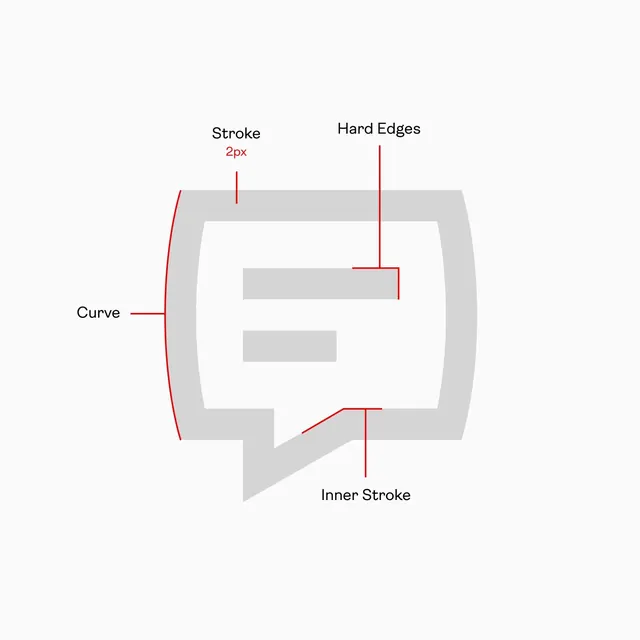
Technical annotation diagram mapping stroke, edge, and curve mechanics on a geometric icon shape using red callout lines and sans-serif labels.
Summary
A technical diagram teaching icon construction by annotating a speech-bubble shape's stroke, edges, and curves with labeled red callout lines.
Visual description
White background with a gray geometric shape resembling a rounded speech bubble or message container. Three nested rectangles of descending size sit inside, rendered in lighter gray. Red single-pixel annotation lines with labels point outward: "Curve" identifies the rounded left edge, "Stroke 2px" marks the outer perimeter, "Hard Edges" indicate the sharp corner transitions on the right, and "Inner Stroke" labels the internal contour. Text is set in clean sans-serif, black on white, positioned to the left and right of the shape. The overall presentation is sparse and instructional, with no extraneous color or detail.
Key takeaway
The use of red on a grayscale diagram creates immediate visual parsing between the teaching element and the subject. Thin callout lines with short labels create a clear hierarchy of information without cluttering the main shape. This annotation approach scales well for design-system guides and icon-grid documentation where precision is paramount.
Reuse notes
Ideal for design-system documentation, icon-library guides, or vector-editing tool tutorials. This pattern works equally well in design software specs, development handoffs, or educational icon-design posts. The grayscale treatment ensures the diagram is unambiguous and reproducible at any size. For color icon systems, add a secondary diagram showing the palette and hierarchy separately to avoid confusion.
More like this


Keep what you find
A free account saves references to boards and can send you a weekly email of picks based on what you save.
To see every result, go Pro.