Preview image. Unlock full-res
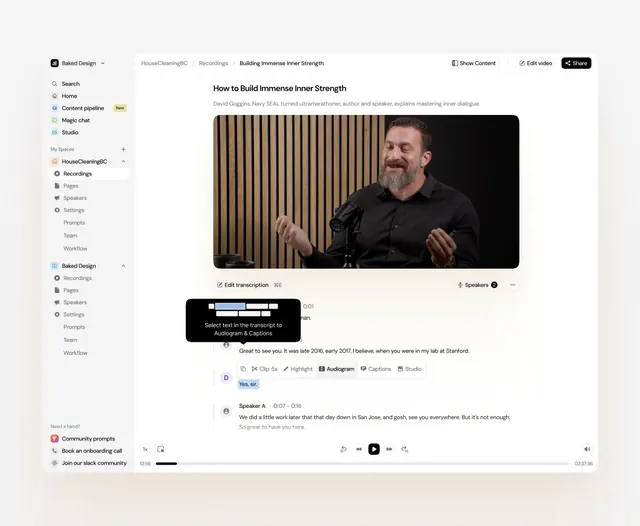
A minimalist media-production interface with persistent left navigation, high contrast light and dark modes, and warm earth-tone accents.
Summary
A minimalist media-production interface with persistent left navigation, high contrast light and dark modes, and warm earth-tone accents.
Visual description
The interface shows a two-panel layout: a narrow dark left sidebar contains hierarchical navigation sections (Home, Content pipeline, Magic chat, Studio, plus workspace items like HouseCleaningBC, Recordings, Pages, Speakers, Settings). The main content area displays a video editing workflow with a large hero video in the center, transcription controls and speaker identification features below, and contextual actions (Edit transcription, Speakers, highlight, audiogram buttons). The color palette alternates the light interface background with deep charcoal sidebar, using warm tan/terracotta accents (buttons, icons). Sans-serif type emphasizes readability and modern efficiency.
Key takeaway
The sidebar-driven navigation pattern works for complex production tools: persistent organization on the left frees the main area for large previews and detailed controls. The light-dark contrast makes dense information scannable. Warm accent tones against neutral backgrounds create warmth without distraction.
Reuse notes
Apply this layout to any production or editing software (video, audio, photo, or code). The sidebar scales well to deep hierarchies, and the accent color treatment is particularly strong for B2B tool design. Works equally well in light or dark themes.
More like this
Keep what you find
A free account saves references to boards and can send you a weekly email of picks based on what you save.
To see every result, go Pro.