Preview image. Unlock full-res
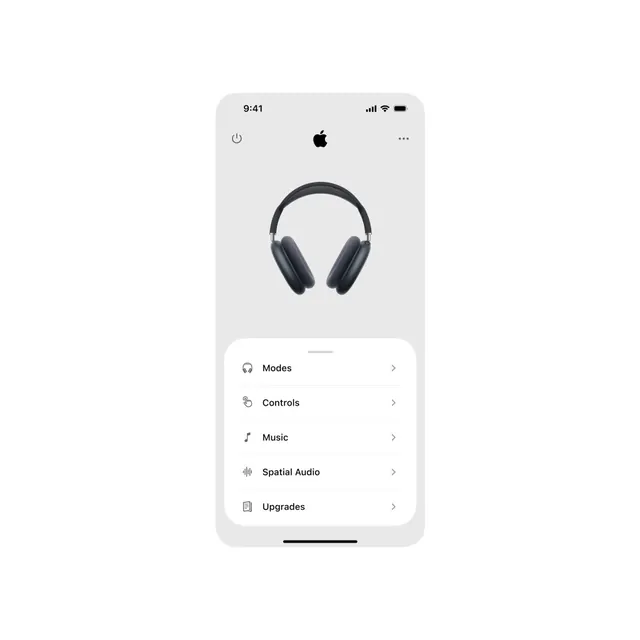
Minimal iOS product settings screen featuring a large product hero shot centered above a stacked list of menu options with monochromatic icons.
Summary
iOS settings screen centered on a device frame, featuring a large product photo (over-ear headphones) above five menu options (Modes, Controls, Music, Spatial Audio, Upgrades) in a clean vertical stack.
Visual description
Minimal iOS mockup on a light grey background, showing a 1x-scale iPhone with standard status bar (time 9:41, signal/battery). Large white negative space dominates the upper half, anchoring a centered product photo of dark grey over-ear headphones. Below, a white rounded container holds five navigation options in a precise vertical list: each option has a left-aligned icon (in dark grey, monochromatic line style), title text in sans-serif, and a right-chevron. Consistent spacing, no distractions, crisp hierarchy.
Key takeaway
The hero-then-list pattern (product visibility before controls); the centered symmetry maintaining focus; monochrome iconography paired with generous whitespace creating a sense of premium simplicity; the consistent left-aligned list structure.
Reuse notes
Strong template for iOS hardware-control apps (audio, smart devices, wearables). The layout scales well when copy is consistent length. Spacing is generous, suits touch targets well. When adapting, ensure icons remain simple and symbolic to maintain the minimal aesthetic.
More like this
Keep what you find
A free account saves references to boards and can send you a weekly email of picks based on what you save.
To see every result, go Pro.