Preview image. Unlock full-res
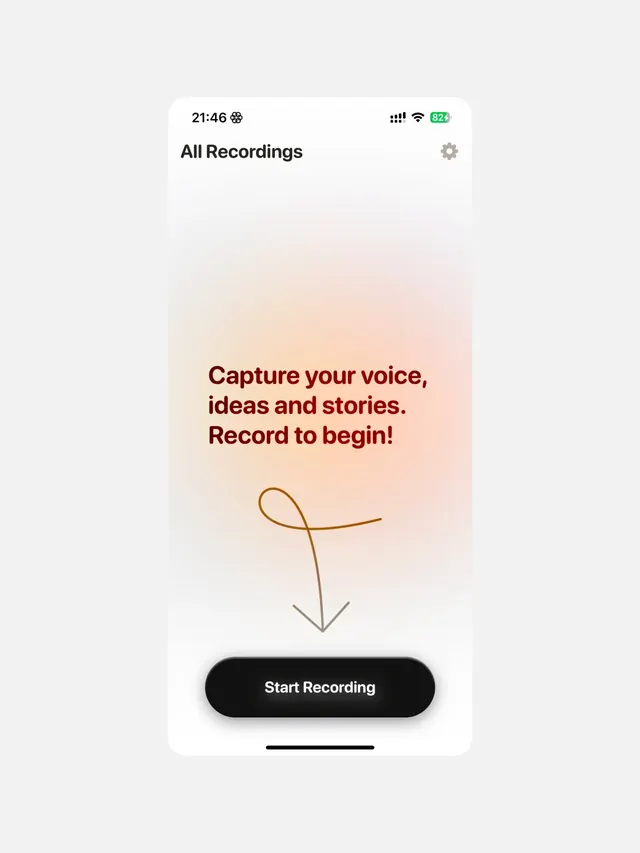
Minimal mobile app screen for audio recording with soft gradient background, conversational headline, and single prominent call-to-action button.
Summary
Minimal mobile app screen for audio recording with soft gradient background, conversational headline, and single prominent call-to-action button.
Visual description
A mobile interface with a light gray header bar containing time (21:46), status icons, and a settings gear. Below, the label "All Recordings" sits at the top left. The main content area transitions from white at the top to a warm peach/coral gradient filling most of the lower half. Centered within the gradient is a multi-line headline in dark brown/maroon sans-serif: "Capture your voice, ideas and stories. Record to begin!" Below the text is a simple single-line microphone icon drawn in warm tan/orange, with a downward-pointing arrow beneath it. At the bottom sits a prominent black rounded-rectangle button labeled "Start Recording" in white sans-serif. A thin black horizontal line appears at the very bottom edge.
Key takeaway
The soft gradient as a psychological anchor that draws focus to the call-to-action without aggression. The conversational, approachable headline copy that speaks directly to user intent ("Capture your voice, ideas and stories"). The minimal icon language (microphone and arrow) that reinforces function without visual clutter. The single, high-contrast button that makes the next action unmistakable.
Reuse notes
Ideal for any content-creation app (voice notes, podcasts, audio journals, meditation apps) where encouraging the user to begin recording is the primary goal. The warm gradient creates an inviting, non-threatening tone. The soft UI aesthetic works well on platforms targeting casual creators and wellness-focused audiences. Avoid on screens requiring multiple competing actions.
More like this

Keep what you find
A free account saves references to boards and can send you a weekly email of picks based on what you save.
To see every result, go Pro.