Preview image. Unlock full-res
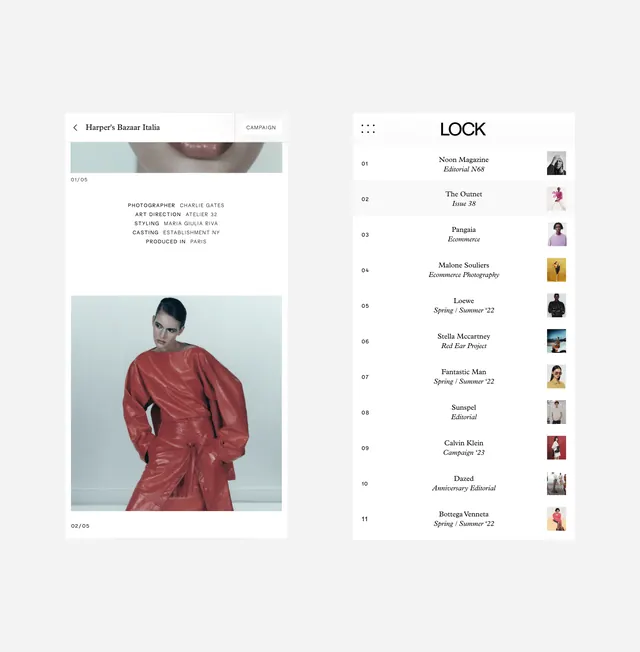
Editorial contents page pairing a large portrait photograph with a numbered list and a grid of small thumbnail images indexed to article titles.
Summary
Editorial contents page showing a full-page portrait photograph on the left with a right-aligned numbered article index and a vertical thumbnail grid linking images to bylines.
Visual description
The left half features a large portrait photograph of a woman in profile. The right side presents 11 numbered entries (01-11) in a tight vertical list, each with a campaign name in bold and publication subtitle in italics. To the far right, a narrow column of small rectangular thumbnail images aligns with each entry. The color palette uses soft warm tones in the photo, light cream background, and muted mauve-brown accents in the typography. All text is set in clean sans-serif; numbers and titles use heavier weights to separate the index structure. A navigation breadcrumb ("Harper's Bazaar India") sits at the top left in sans-serif caps.
Key takeaway
The pairing of a hero photograph with a compact, numbered reference index creates visual interest while keeping information scannable. The narrow thumbnail column acts as a visual anchor and indexing mechanism without consuming page real estate. The warm, muted color palette in both photo and typography creates coherence and approachability.
Reuse notes
Strong pattern for magazine and journal contents pages, editorial portfolios, or exhibition guides where you need to reference multiple items while maintaining visual elegance. The single large photo draws focus while the compact index on the right allows quick navigation. Works best when images on the right have consistent aspect ratios and strong composition. The warm color treatment suits lifestyle, arts, and culture publications.
More like this

Keep what you find
A free account saves references to boards and can send you a weekly email of picks based on what you save.
To see every result, go Pro.