Preview image. Unlock full-res
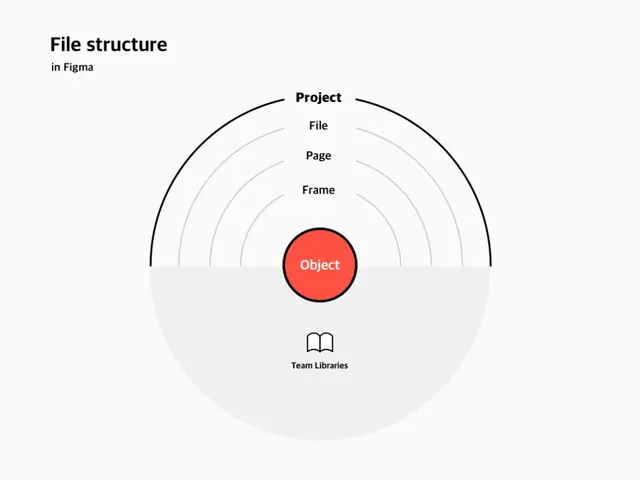
Concentric-ring diagram showing Figma's organizational hierarchy from Project down to Object, with a central red circle and Team Libraries labeled below.
Summary
A diagrammatic explanation of Figma's organizational structure using nested concentric rings labeled Project, File, Page, Frame, with Object at the core highlighted in coral red.
Visual description
Five concentric circles in light gray and black lines, each labeled to show Figma's nested hierarchy. From outer to inner: Project, File, Page, Frame, and Object at the center. The Object circle is filled with bright coral-red (#FE5243) and rendered with a bold black stroke, making it the visual anchor. Light gray background fills the entire composition. Below the diagram, a small book icon with the label "Team Libraries" in sans-serif type indicates the shareable asset layer. All text is set in clean, medium-weight sans-serif for technical clarity.
Key takeaway
The concentric-ring pattern for visualizing multi-level hierarchies; the use of one bright accent color to emphasize the innermost level; the minimal, grid-aligned layout that works at any scale.
Reuse notes
Ideal for software documentation, onboarding flows, and API diagrams where you need to explain nested structures without cognitive overload. Works best on light backgrounds. The radial symmetry keeps the eye moving inward naturally.
More like this




Keep what you find
A free account saves references to boards and can send you a weekly email of picks based on what you save.
To see every result, go Pro.