Preview image. Unlock full-res
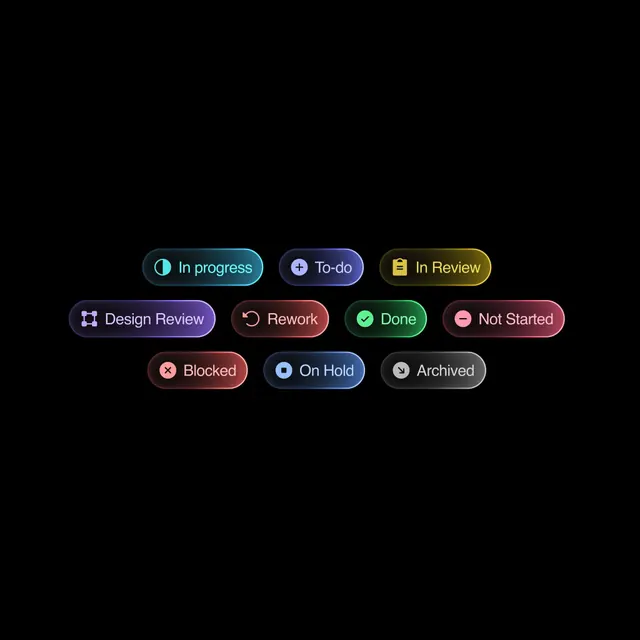
A collection of nine color-coded status badges for tracking task workflow states in project management interfaces.
Summary
Nine color-coded rounded-pill badges representing common workflow states: In Progress (cyan), To-do (violet), In Review (gold), Design Review (purple), Rework (red), Done (green), Not Started (pink), Blocked (dark red), and On Hold (slate blue). Each pairs an icon with a status label on a black background.
Visual description
The badges are arranged in three rows on a pure black background, with each pill-shaped container holding a unique hue, a small left-aligned icon, and white sans-serif text. Top row: cyan with pause icon, violet with plus icon, gold with bookmark icon. Middle row: purple with shield icon, red with undo-arrow icon, green with checkmark icon, pink with minus icon. Bottom row: dark red with X icon, slate blue with clock icon, charcoal with archive icon. All pills use consistent rounded corners and stroke weight; icons are simple and monochromatic. Color saturation is high except on the charcoal badge (lower chroma on neutral dark). No gradients or shadows.
Key takeaway
The color logic: each status gets a distinct, high-saturation hue paired with a universal white icon, making instant recognition possible in dense lists. The rounded-pill shape feels modern and softer than rectangular buttons, while the pure-black backdrop makes all colors pop equally. Icon placement (left side) keeps text visually dominant over graphics.
Reuse notes
Perfect for project-management, issue-tracking, and workflow dashboards where multiple states must be scannable at a glance. Works best when the status count stays under 10 (more badges become harder to distinguish). The black background is non-negotiable for color saturation; lighter backgrounds will mute the effect.