Preview image. Unlock full-res
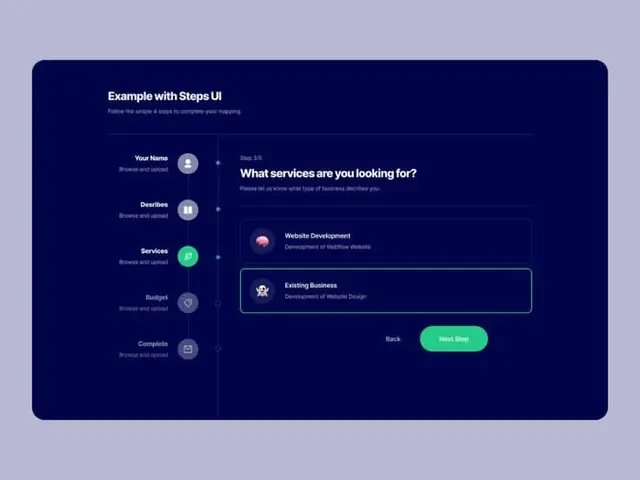
Dark blue onboarding form with five sequential steps marked by colored avatar icons and a scrolling question panel, guiding users through service selections.
Summary
Dark blue onboarding form with five sequential steps marked by colored avatar icons and a scrolling question panel, guiding users through service selections.
Visual description
Left-side vertical stepper shows five steps (Your Name, Describes, Services, Budget, Complete) marked by circular avatar icons in mint-green, lavender, and gray, connected by a vertical dotted line. Each step label is light gray on dark blue. The main content area on the right shows the current question "What services are you looking for?" with two selectable option cards (Website Development, Existing Business) in outlines, plus Back and Next Step buttons at the bottom in teal-green. The entire frame is rounded-corner dark blue with subtle internal structure; the background is pale lavender.
Key takeaway
The vertical timeline with compact colored-icon markers for progress; the dual-CTA layout (ghost back, filled next) at the fixed bottom; the selective highlighting of current step via bright mint icon while others remain muted.
Reuse notes
Strong pattern for onboarding, intake forms, setup wizards, or multi-stage configuration flows. Works especially well for B2B SaaS where users need clear progress indication. The narrow left column keeps focus on one question at a time while the timeline reassures of the multi-step process ahead.