Preview image. Unlock full-res
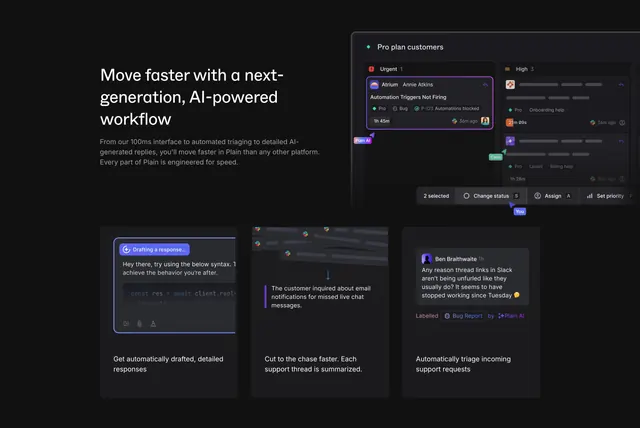
Dark feature section with a left headline beside a large support-inbox mockup, over a three-column row of UI snippet cards.
Summary
A dark feature section that puts a three-line headline on the left against a large support-inbox kanban mockup on the right, then runs a three-column row of AI-capability UI cards beneath.
Visual description
On near-black, the top row splits a left-aligned three-line white headline ("Move faster with a next-generation, AI-powered workflow") and two lines of muted subcopy against a wide dark product mockup of a "Pro plan customers" board with Urgent and High columns, tagged tickets, avatars, and a floating "Change status / Assign / Set priority" action bar with small "Plain AI", "Carla", and "You" pointer labels. Below, three equal dark cards each show a UI snippet over a caption: a violet-outlined "Drafting a response..." composer with code, a collapsed thread with a summarized note, and a "Ben Braithwaite" message auto-labelled "Bug Report" by Plain AI. No CTA button appears in the frame.
Key takeaway
The floating multi-pointer action bar with named cursors makes a static mockup feel collaborative and alive. Pairing one big hero mockup with three smaller proof-snippet cards lets a single feature be told at two zoom levels. Showing AI actions as in-context UI (drafting, summarizing, auto-labelling) is more convincing than describing them.
Reuse notes
Suited to an AI-assisted support or collaboration tool with real, screenshot-worthy product surfaces. The named-cursor labels imply real-time multiplayer, so only use them if that is true. Works as a mid-page deep-dive; pair with a CTA-bearing section before or after since this one has none.